Global Resource Quotas
Global Resource Quota defines the default resource limits copied to every new customer account under a Cloud Provider setup. Customer-facing quota for CloudStack is managed entirely in CMP — not through CloudStack quota APIs.
You can set global quotas in two places:
| When | Where |
|---|---|
| Cloud Provider onboarding | Wizard Step 6 — Global Quota when adding a Cloud Provider setup |
| After go-live | Settings → Quota → Global Resource Quota |
Global Resource Quota settings apply only to customers registered after the quota is updated.
When a new customer is created, CMP copies the current global quota into that customer's account-specific quota. Later changes to the global quota do not update existing customers — their limits stay independent after creation.
To change limits for an existing customer, use Account-Level Quotas.
Configure during Cloud Provider Setup (onboarding)
When you add a Cloud Provider setup for CloudStack, Wizard Step 6 sets the initial global quota for that setup.
Path: Settings → Cloud Providers → [Add / Edit setup] → Step 6 — Global Quota
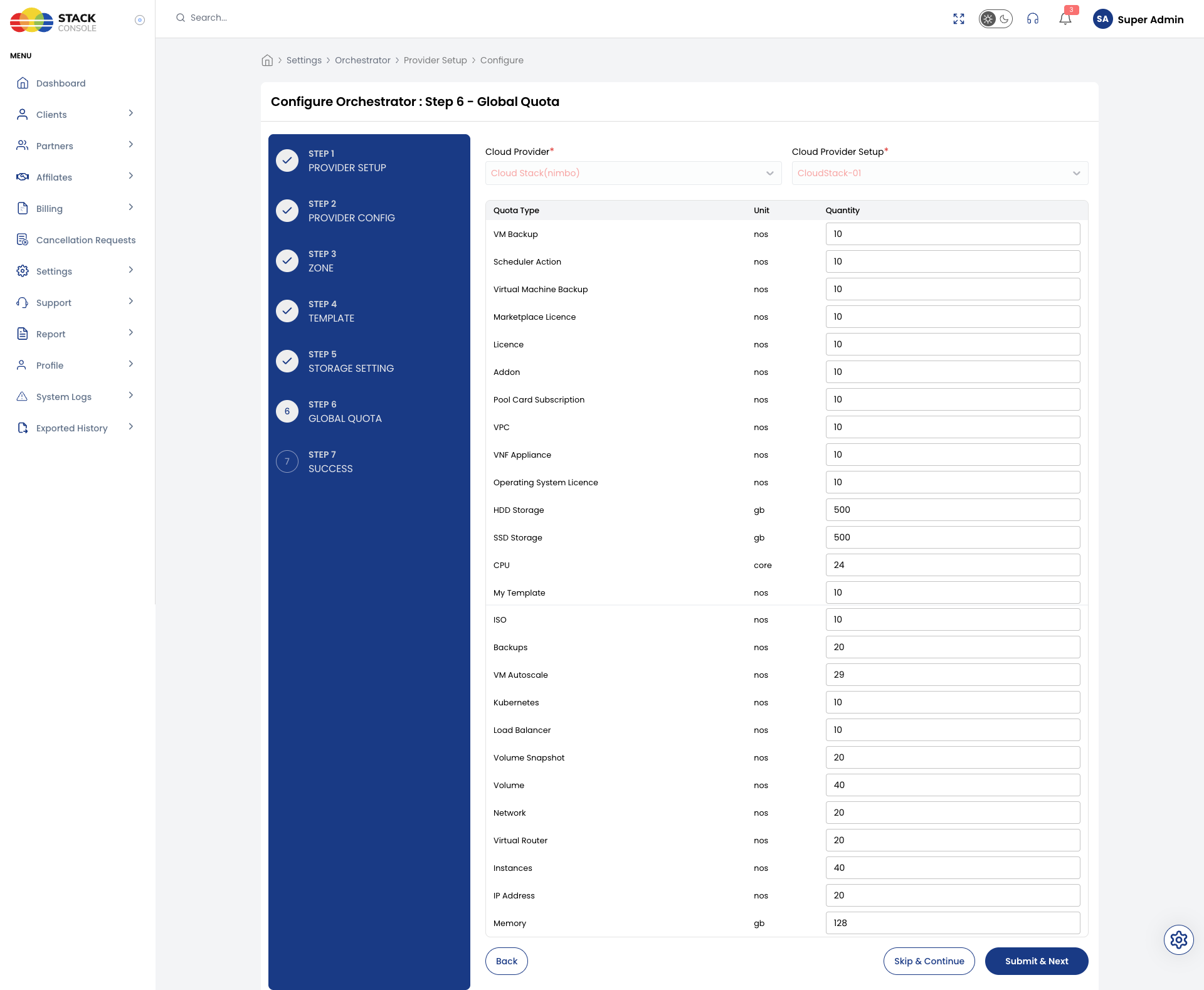
Full onboarding flow (including Step 6): Connecting CMP to CloudStack — Wizard Step 6
Select:
| Field | Purpose |
|---|---|
| Cloud Provider | Orchestrator type (for example, Cloud Stack) |
| Cloud Provider Setup | Specific setup (for example, CloudStack-01) |
Then set the quantity for each quota type shown for that setup.
Configure from Settings (after onboarding)
Update default quotas for a Cloud Provider setup at any time without re-running the wizard.
Path: Settings → Quota → Global Resource Quota
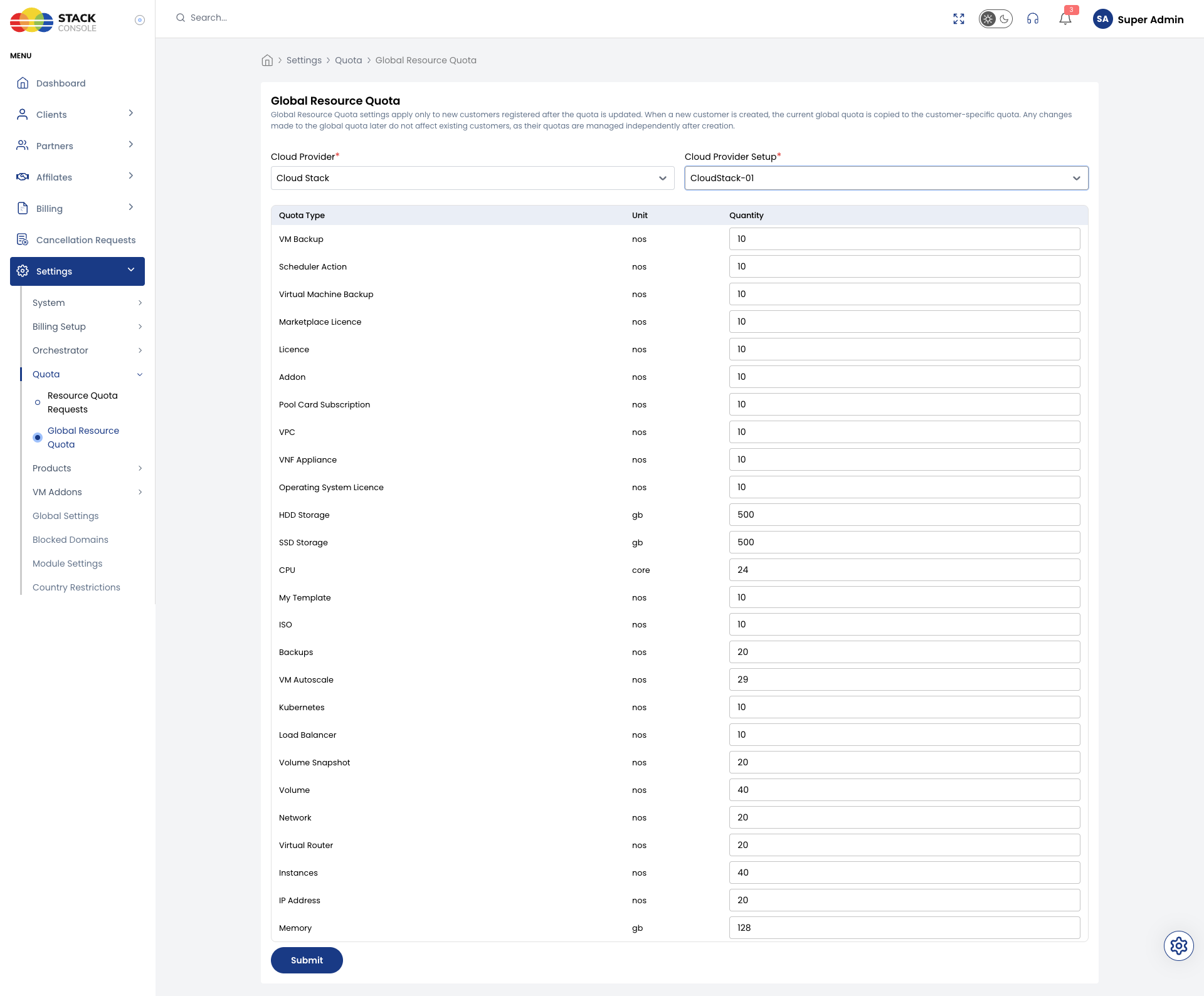
- Select Cloud Provider (for example, Cloud Stack)
- Select Cloud Provider Setup (for example,
CloudStack-01) - Edit Quantity for each Quota Type
- Save
Saving a new global quota does not change customers who already have an account under this setup. Only new registrations receive the updated defaults.
Quota types (CloudStack setup)
Resource rows shown depend on services enabled for the Cloud Provider setup. Typical CloudStack global quota fields:
Compute and memory
| Quota Type | Unit | Example |
|---|---|---|
| Instances | nos | 40 |
| CPU | core | 24 |
| Memory | gb | — |
| VM Autoscale | nos | 29 |
| Kubernetes | nos | 10 |
Storage
| Quota Type | Unit | Example |
|---|---|---|
| HDD Storage | gb | 500 |
| SSD Storage | gb | 500 |
| Volume | nos | 40 |
| Volume Snapshot | nos | 20 |
| Backups | nos | 20 |
| VM Backup | nos | 10 |
| Virtual Machine Backup | nos | 10 |
Networking
| Quota Type | Unit | Example |
|---|---|---|
| Network | nos | 20 |
| VPC | nos | 10 |
| Virtual Router | nos | 20 |
| Load Balancer | nos | 10 |
| IP Address | nos | 20 |
Images and templates
| Quota Type | Unit | Example |
|---|---|---|
| My Template | nos | 10 |
| ISO | nos | 10 |
Licences and add-ons
| Quota Type | Unit | Example |
|---|---|---|
| Licence | nos | 10 |
| Operating System Licence | nos | 10 |
| Marketplace Licence | nos | 10 |
| Addon | nos | 10 |
| Pool Card Subscription | nos | 10 |
| Scheduler Action | nos | 10 |
| VNF Appliance | nos | 10 |
Storage categories and tiers in CMP relate to Storage Settings. Packages that consume these quotas are under Offering Sync and Packages.
CloudStack and CMP quota (important)
For CloudStack, customer quota is configured and enforced in CMP. Admins do not manage day-to-day customer limits via CloudStack quota APIs.
CloudStack still has its own domain / account / project limits (max.* Global Settings). Those limits remain active in CloudStack and can block provisioning if they are lower than CMP quota.
| Layer | Role | Documentation |
|---|---|---|
| CMP Global Resource Quota | Defaults copied to new customers | This page |
| CMP Account / Project quota | Per-customer and within-account limits | Account-Level Quotas, Project-Level Quotas |
| CloudStack Global Settings | Orchestrator-side max.* caps (keep ≥ CMP or -1) | Quota Management (ACS) |
| Alignment guidance | Keep orchestrator limits above CMP | Orchestrator-Side Quota Sync |
When configuring CloudStack for CMP:
- Set CMP global quota (onboarding Step 6 or Settings → Quota)
- Raise CloudStack
max.account.*/max.project.*(or set-1) — see Configuring CloudStack quotas - Use Mapping CMP quotas to CloudStack settings when comparing values