Account-Level Quotas
CMP manages quotas at account and project levels:
| Level | Who sets it | Role |
|---|---|---|
| Account | CMP admin | Hard ceiling for the customer account |
| Project | Account owner | Distributes account capacity across projects — Project-Level Quotas |
Account-level quotas are the limits on an individual customer account. When a new customer is registered, CMP copies the current Global Resource Quota into that account. Admins can then raise or lower account limits as needed.
When to use
- A customer needs more resources than the global default allows
- A premium customer has a dedicated resource allocation
- A specific customer's quota needs to be restricted below the global default
Configuring account-level quotas
Path: Clients → [Customer] → Quota Settings (admin panel)
Set per-resource limits for this account. These values apply to this customer only and become the ceiling for all project-level quotas under the account.
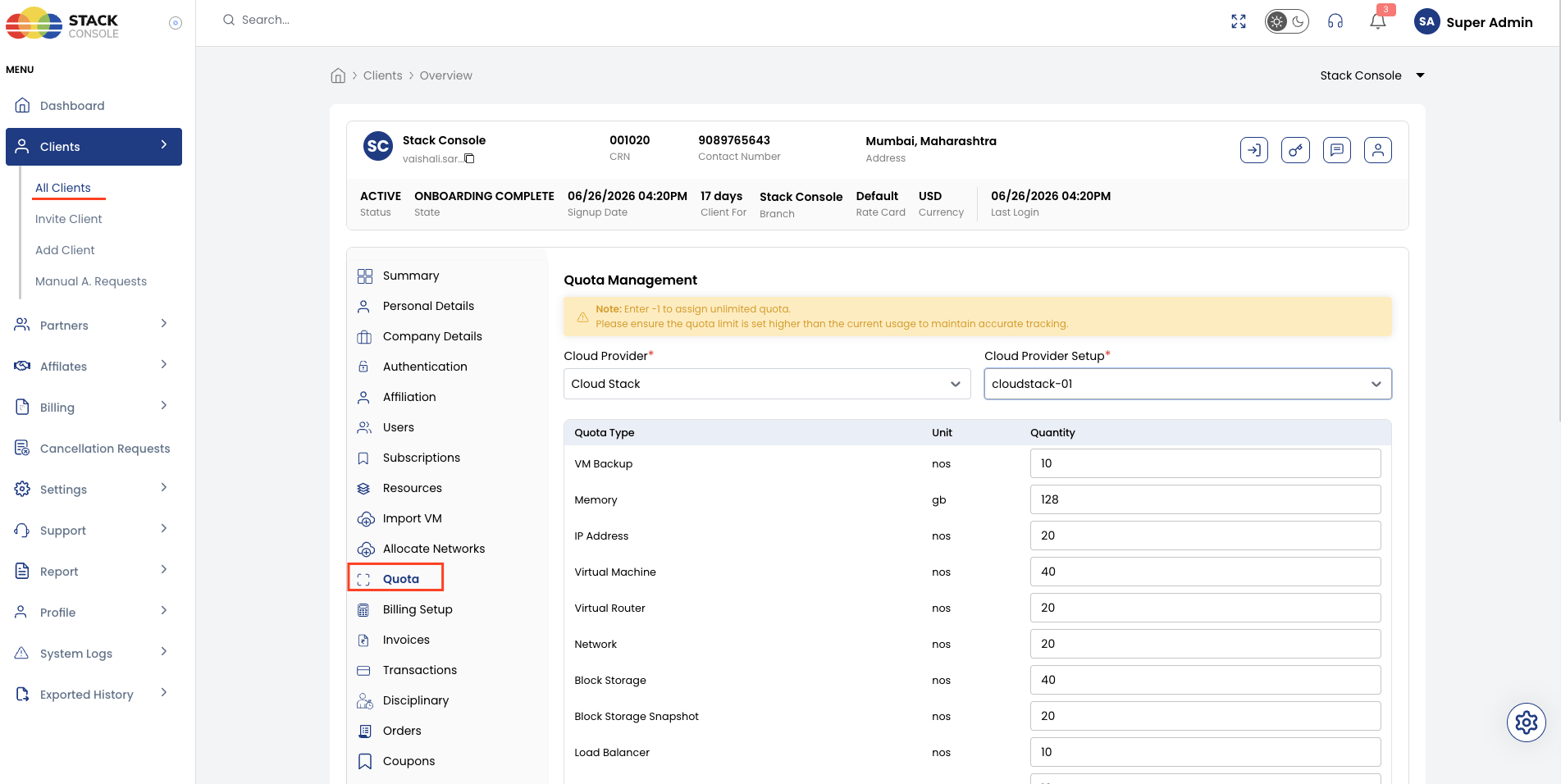
Quota hierarchy
Global Resource Quota (defaults for new accounts only)
        │
        ├── Customer A — account quota (copied from global at registration)
        │       ├── Project 1 — Unlimited by default (owner can limit)
        │       └── Project 2 — Unlimited by default (owner can limit)
        │
        └── Customer B — account quota raised by admin
                └── Projects still start Unlimited; owner adjusts as needed
See Project-Level Quotas — new projects start with Unlimited quota; the account owner updates them on the project details page.
Key rules
- Account quota is the hard ceiling for a customer — project quotas within the account can never exceed the account total
- Setting an account quota to
0blocks provisioning of that resource type entirely - Setting to
-1or unlimited removes the CMP-side cap for that resource (orchestrator limits still apply — see Quota Management (ACS) for CloudStack)
End-user perspective
From the customer's side:
- They see their account quota in the portal
- When they reach the account limit, they can submit a Quota Request to the admin
- The account owner can set project quotas on each project's details page to allocate capacity to teams or sub-users