Volume Snapshot Packages
Volume Snapshot packages define how CMP bills customers for block storage volume snapshots (BS_SNAPSHOT). When a customer takes a snapshot of a root or data volume, CMP charges based on the current snapshot size and the per-GB hourly rate configured in this package.
Unlike Volumes packages, volume snapshot packages do not map to fixed-size CloudStack disk offerings. Snapshot size is determined at creation time and can change as the underlying volume grows or as CloudStack reports physical snapshot size.
CMP allows only one Volume Snapshot package per Cloud Provider Setup + Zone combination. You cannot create multiple snapshot packages (for example, separate tiers) for the same setup and zone.
Free trials are not applicable to Volume Snapshot packages. The Create Volume Snapshot Package form does not include Enable Free Trial. Snapshot billing starts from the moment a snapshot is created (subject to the free snapshot allowance global setting).
Ensure the following are already configured:
- Cloud Provider Setup is connected, with Block Storage Snapshot enabled in Wizard Step 1
- Zones are mapped in CMP
- CloudStack snapshot support is enabled for your hypervisor — for KVM, set
kvm.snapshot.enabled = truein CloudStack Global Settings - You understand hourly per-GB billing — volume snapshots cannot use predefined fixed-size packages
CMP path: Settings → Billing Setup → Rate Cards → Default → Packages → Volumes Snapshot
How volume snapshot billing works
When a customer creates a volume snapshot, CMP:
- Records the snapshot in CloudStack via the CloudStack API
- Tracks the current snapshot size in GB (logical or physical — see below)
- Applies the price per GB per hour from the Volume Snapshot package for that zone
- Bills continuously on an hourly basis until the snapshot is deleted
Billing formula
Volume snapshot cost per hour = current snapshot size (GB) × price per GB per hour
Example: A 50 GB snapshot at $0.01/GB/hour costs $0.50/hour for as long as the snapshot exists.
Billing stops when the customer deletes the snapshot. See also How is snapshot cost calculated? in the billing FAQ.
Volume snapshots (BS_SNAPSHOT) always use hourly billing only. Monthly, quarterly, and yearly billing cycles are not available for this service type. See Billing Cycles.
Why only hourly per-GB pricing?
Volumes packages work with predefined fixed sizes — for example, 80 GB or 500 GB disk offerings. Customers pick a known size at provisioning time, so CMP can sell predefined packages with flat monthly or hourly rates.
Volume snapshots are different:
| Factor | Why predefined packages do not work |
|---|---|
| Unknown size at creation | Snapshot size depends on the source volume. Customers can create volumes with custom sizes, so the snapshot size is not known when you configure packages |
| Size changes over time | A snapshot's billed size can change if the underlying volume is modified or if CloudStack reports updated physical snapshot size |
| Physical size billing | If CloudStack supports physical snapshot size and your Cloud Provider Setup is configured to charge based on physical size, the exact size is not known in advance |
For these reasons, CMP charges volume snapshots hourly based on current snapshot size × price per GB per hour, not a fixed package price.
Free snapshot allowance
CMP supports a configurable number of free volume snapshots through Global Settings.
In Admin Panel → Global Settings, locate the free_snapshot setting:
| Value | Behaviour |
|---|---|
false | Free snapshots disabled — all snapshots are billed per the Volume Snapshot package |
Greater than 0 | That many volume snapshots are free per account — pricing is shown as 0 to the customer until the free allowance is used |
Use free_snapshot to offer a limited number of free snapshots (for example, 3) without creating a separate package tier. Once the allowance is exceeded, standard per-GB hourly billing applies from the zone's Volume Snapshot package.
CloudStack prerequisites
Volume snapshots require CloudStack snapshot support on the target zone and storage backend.
- Enable Block Storage Snapshot in CMP Cloud Provider Setup (Wizard Step 1)
- For KVM hypervisors, set
kvm.snapshot.enabled = truein CloudStack Global Settings - Confirm snapshot operations work from the CloudStack UI before enabling customer self-service
- Review snapshot limitations for your storage type — see Snapshot & Backup (pre-4.20)
Taking snapshots of a running VM's root disk is disabled by default in recent CloudStack versions. Enable kvm.snapshot.enabled = true if customers need root volume snapshots on KVM.
Configure Volume Snapshot packages in CMP
Create one Volume Snapshot package per Cloud Provider + Setup + Zone.
- Open Settings → Billing Setup → Rate Cards → Default → Packages → Volumes Snapshot
- Click Add Package (form title: Create Volume Snapshot Package)
- Complete each field below in the order shown on the form
- Set Status to Active and save
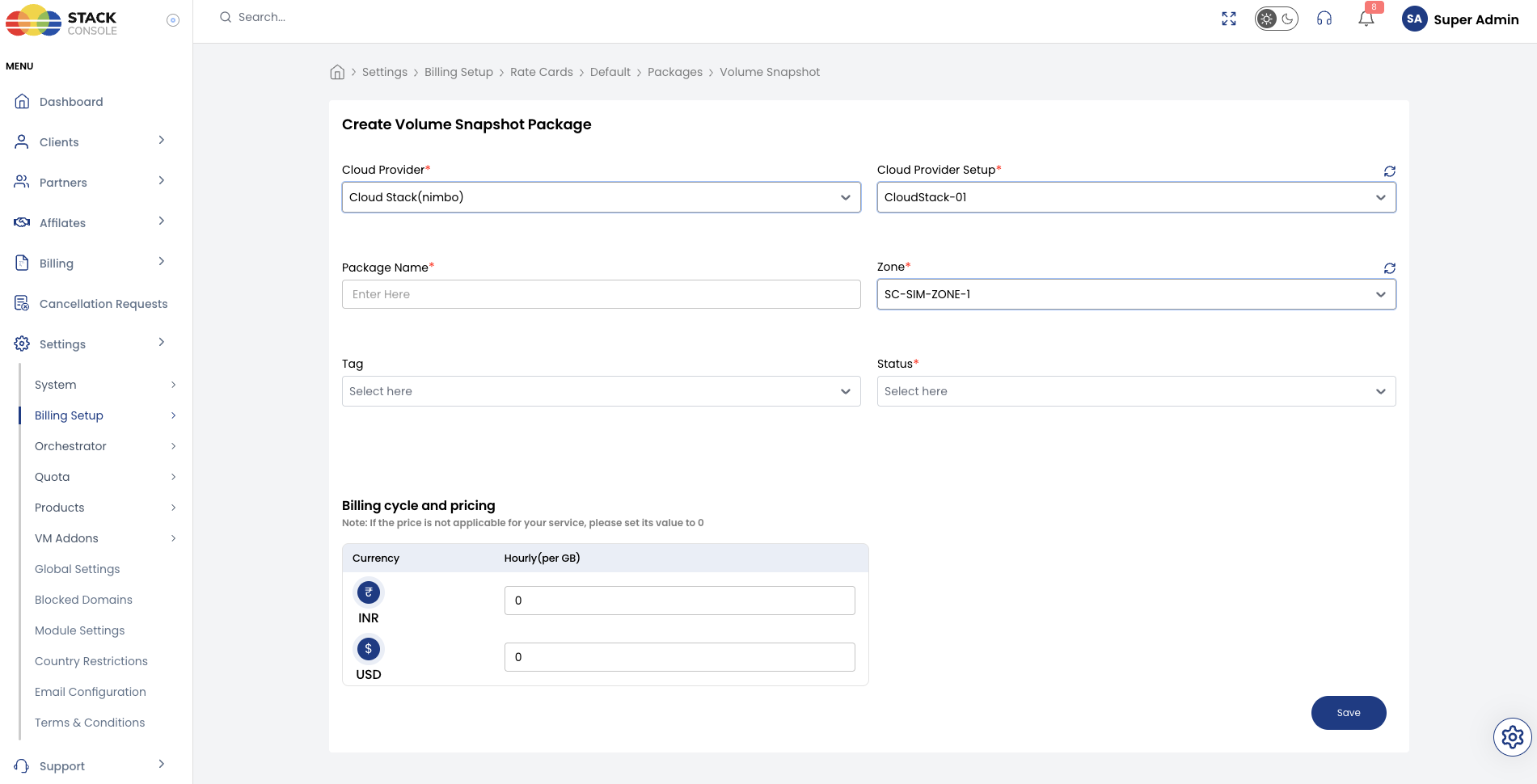
Each field below matches the Create Volume Snapshot Package form.
Cloud Provider
Required. Select the orchestrator type — for example, CloudStack (Nimbo).
Cloud Provider Setup
Required. Select the CloudStack instance this package belongs to — for example, CloudStack-01.
CMP supports one Volume Snapshot package per Cloud Provider Setup + Zone.
Package Name
Required. Display name for the snapshot service — for example, Volume Snapshot or Block Storage Snapshot.
Zone
Required. Select the CMP zone where this snapshot pricing applies — for example, SC-SIM-ZONE-1.
Tag
Optional. Assign a tag for filtering or promotional labelling in the customer portal.
Tags are CMP-level labels used for representation only. They do not map to CloudStack host or storage tags.
Status
Required. Controls package visibility.
| Status | Behaviour |
|---|---|
| Active | Snapshot pricing applies when customers create volume snapshots in this zone |
| Inactive | Hidden — use while configuring pricing or testing |
Price per GB per hour
Required. Enter the hourly rate per gigabyte of snapshot storage.
CMP calculates the customer's charge as:
current snapshot size (GB) × price per GB per hour = snapshot cost per hour
This is the only billing cycle available for volume snapshots. There is no monthly or yearly option on this form.
The Create Volume Snapshot Package form does not include Enable Free Trial. Use the free_snapshot global setting if you want to offer a limited number of free snapshots.
End-to-end example
Goal: Charge for volume snapshots in zone SC-SIM-ZONE-1 at $0.01/GB/hour, with 2 free snapshots per account.
CMP global settings
- Set
free_snapshotto2in Admin Panel → Global Settings
CloudStack
- Confirm
kvm.snapshot.enabled = true(KVM environments) - Verify snapshot creation works for a test volume in
SC-SIM-ZONE-1
CMP package
- Open Packages → Volumes Snapshot → Add Package
- Set Cloud Provider CloudStack (Nimbo), Cloud Provider Setup
CloudStack-01, Package NameVolume Snapshot, ZoneSC-SIM-ZONE-1 - Enter price per GB per hour — for example,
0.01 - Set Status to Active and save
A customer with a 100 GB volume snapshot is charged 100 × 0.01 = $1.00/hour after their free snapshot allowance is used.
Customer portal view
End customers can create volume snapshots in two ways — manual (one-time) or scheduled (CMP-level recurring scheduler). Both are billed at the zone's per-GB hourly rate from the Volume Snapshot package. Snapshots can only be restored to equal or larger disks.
This section covers the customer flows at a high level. A dedicated page for snapshot scheduling, retention policies, and restore workflows will be added later.
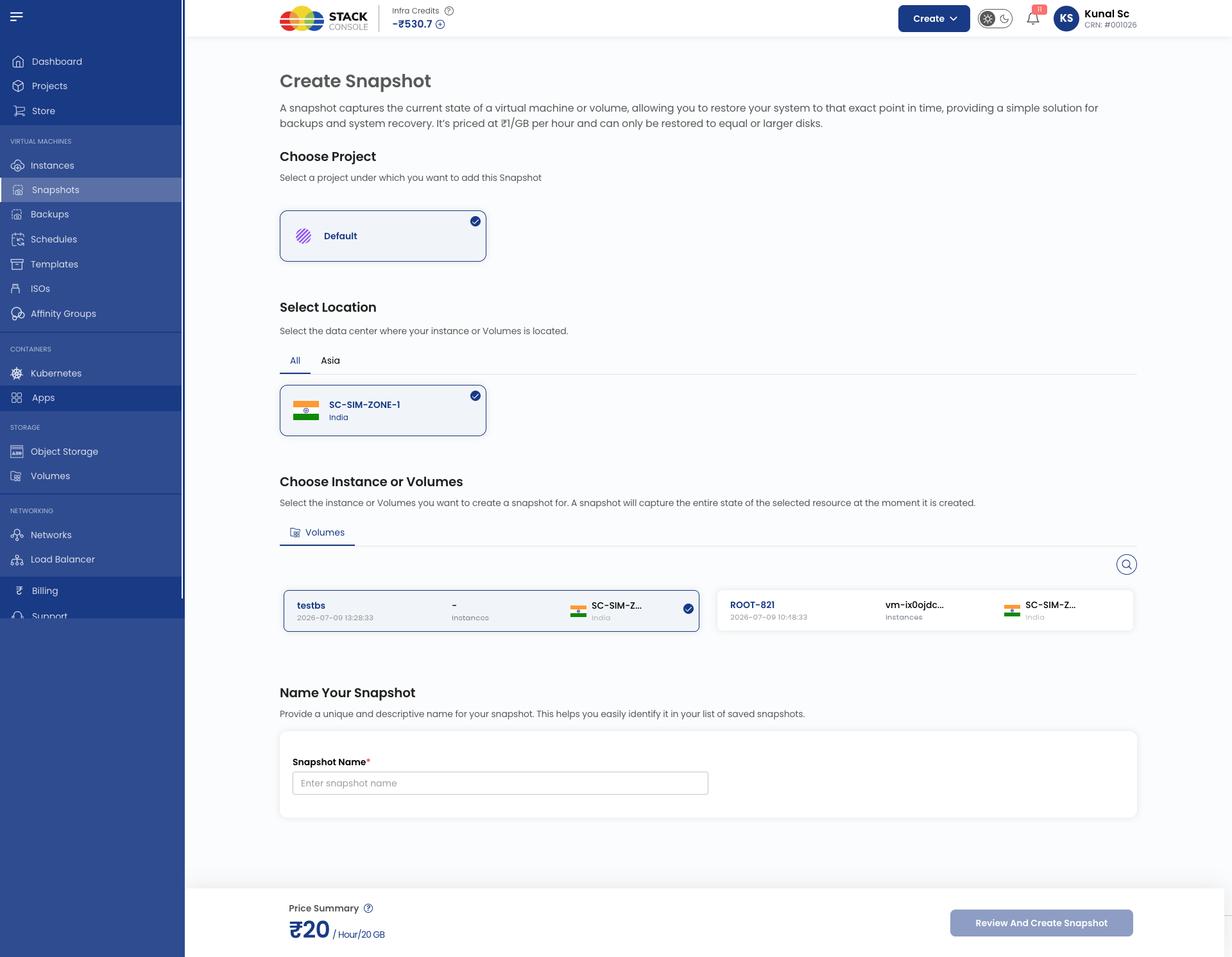
1. Manual snapshot — Create Snapshot
Customers open Create Snapshot to capture the current state of an instance or volume at a point in time.
| Step | What the customer selects |
|---|---|
| Choose Project | Project under which the snapshot is created |
| Select Location | Zone / data center — for example, SC-SIM-ZONE-1 |
| Choose Instance or Volumes | Source resource — a volume (data disk) or instance (root disk) |
| Name Your Snapshot | Unique name to identify the snapshot in the list |
Pricing is shown on the form — for example, ₹1/GB per hour — based on the Volume Snapshot package for the selected zone.
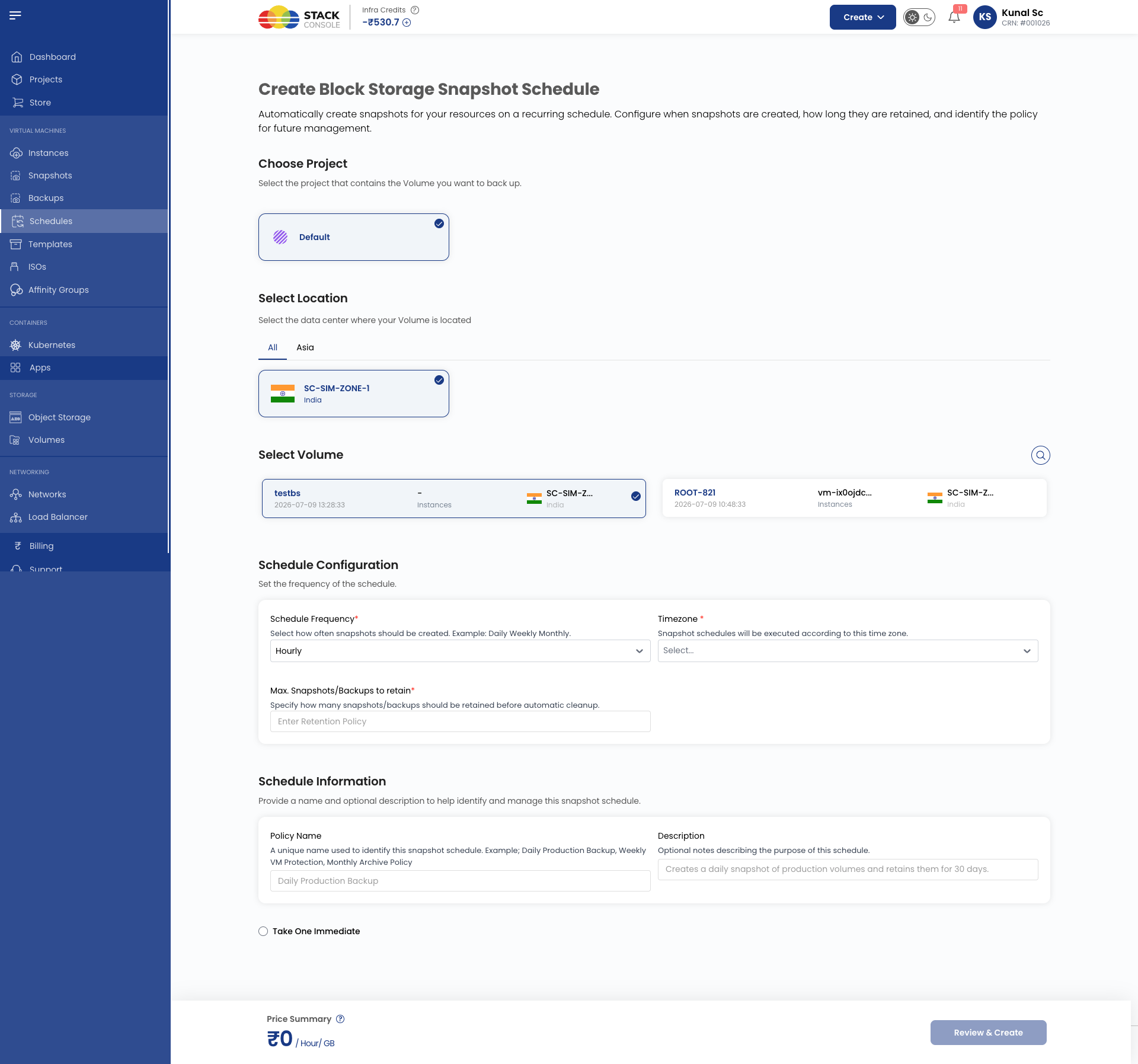
2. Scheduled snapshot — Create Block Storage Snapshot Schedule
Customers open Create Block Storage Snapshot Schedule to automate recurring snapshots via CMP's built-in scheduler (not CloudStack's native scheduler).
| Step | What the customer selects |
|---|---|
| Choose Project | Project containing the volume to back up |
| Select Location | Zone / data center — for example, SC-SIM-ZONE-1 |
| Select Volume | Target volume (required) |
| Schedule Frequency | How often snapshots run — Hourly, Daily, Weekly, or Monthly |
| Timezone | Time zone used to execute the schedule |
| Max. Snapshots/Backups to retain | Retention count — oldest snapshots are removed when the limit is exceeded |
| Policy Name | Unique schedule name — for example, Daily Production Backup |
| Description | Optional notes on the schedule purpose |
| Take One Immediate | Optional checkbox to run the first snapshot immediately on save |
Billing note
When free_snapshot is greater than 0, the first N snapshots show $0.00 pricing until the allowance is consumed. Scheduled snapshots are billed the same way as manual snapshots — hourly, based on current snapshot size × price per GB per hour.
Validation checklist
Before marking a Volume Snapshot package Active, verify:
- Block Storage Snapshot service is enabled in Cloud Provider Setup (Wizard Step 1)
kvm.snapshot.enabled = truein CloudStack (KVM environments)- Snapshot creation works from the CloudStack UI in the target zone
- Price per GB per hour is set for the package
free_snapshotglobal setting reflects your intended free snapshot policy- Global quotas allow sufficient Snapshots count per account
- CloudStack snapshot quota limits are set high enough — see Quota Management (ACS)