Virtual Router / VPC Packages
Virtual Router / VPC packages define the VPC tiers customers select when creating a Virtual Private Cloud in CMP. Each package maps directly to CloudStack offerings:
- VPC Offering — VPC-level services and virtual router sizing (via linked system service offering)
- VPC Network Offering — guest tier network used when customers add networks inside the VPC
- Network Rate (Mb/s) — throughput tier exposed to customers
Use multiple packages to offer tiered VPC plans — for example, Basic VPC and High-Performance VPC with different offerings and network rates.
Ensure the following are already configured:
- Cloud Provider Setup is connected, with VPC/Virtual Router enabled in Wizard Step 1
- Default VPC ACL Allow ID is set in Provider Config (Wizard Step 2) if you use default allow ACLs for new VPCs
- Zones are mapped in CMP for each datacenter region
- VPC offerings and VPC guest network offerings exist in CloudStack for each tier you plan to sell — see CloudStack prerequisites below
CMP path: Settings → Billing Setup → Rate Cards → Default → Packages → Virtual Router/VPC
How VPC virtual routers work in CloudStack
When a customer creates a VPC through CMP, CloudStack deploys a VPC virtual router — a system VM that provides routing, NAT, DHCP, DNS, VPN, and other VPC-level network services.
The virtual router's capacity is determined by the system service offering linked to the VPC offering:
| Layer | CloudStack object | CMP package field |
|---|---|---|
| System service offering | Service Offerings → System Offering | (linked inside VPC offering — not set on CMP package) |
| VPC offering | Network → VPC → VPC Offerings | Vpc Offering |
| VPC guest network offering | Service Offerings → Network Offering (For VPC = Yes) | VPC Network Offering |
| Throughput | Network rate on network offering | Network Rate (Mb/s) |
| Customer tier | — | Package Name, zone scope, and pricing |
Refer to the Apache CloudStack service offerings guide and VPC offering API.
Isolated networks (non-VPC) also use a dedicated virtual router per network, but they are provisioned through network offerings, not VPC offerings. CMP can bill isolated networks separately when enable_network_billing is enabled and network packages are configured.
This page covers VPC packages. Isolated network billing uses the same virtual router concepts but a different offering type and billing flag.
Feature behaviour (tiers, ACLs, Source NAT limits): VPC Network.
CloudStack prerequisites
Create offerings in CloudStack before creating CMP packages. Plan one VPC offering per tier you want to sell (for example, Basic VPC and High-Performance VPC).
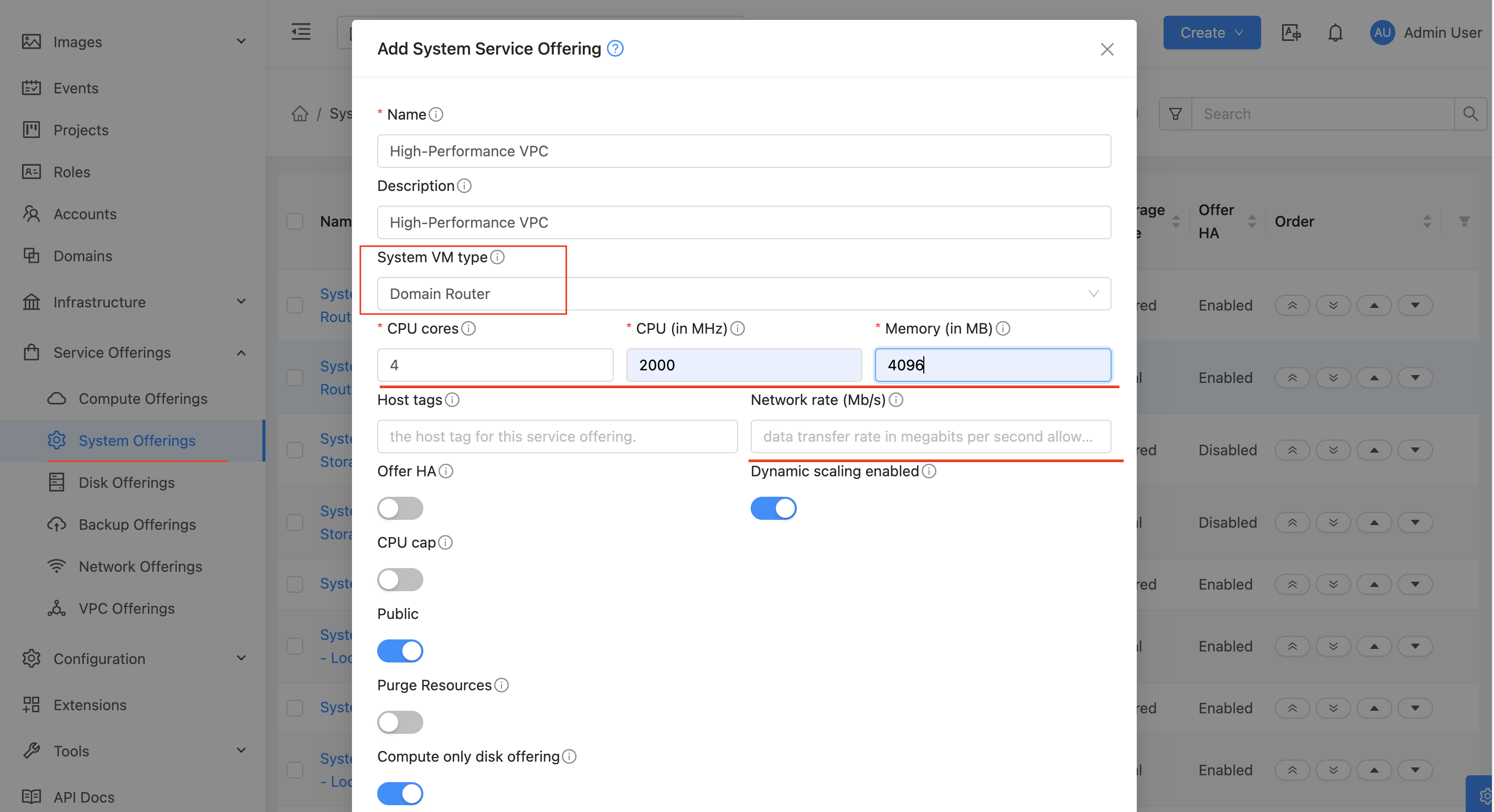
Step 1 — Create system service offerings
System service offerings define the virtual router VM's compute resources. Create one per VPC tier — for example, Basic and High-Performance.
- Log in to the CloudStack UI with root admin privileges
- Navigate to Service Offerings → System Offering
- Click Add System Offering
- Configure the offering — for example:
- Name:
VR-BasicorVR-High-Performance - System VM Type: Domain Router
- CPU (in MHz) and # of CPU cores — higher values improve VPN encryption and load-balancing throughput
- Memory (in MB) — allocate more memory for high connection-count workloads (web servers, NAT-heavy traffic)
- Name:
- Scope the offering to the target Zone(s)
- Click Add
Common sizing scenarios from production deployments:
| Workload | Recommended VPC tier |
|---|---|
| Basic VPC | Basic system offering — standard routing and NAT |
| High-Performance VPC | High-Performance system offering — more CPU and memory for demanding workloads |
| High connection count | High-Performance tier with more memory — virtual router tracks large NAT connection tables |
| Heavy VPN / encryption | High-Performance tier with higher CPU MHz — encryption is CPU-intensive |
| VR as load balancer | High-Performance tier with more CPU — distributes traffic across many backend VMs |
Step 2 — Create VPC offerings
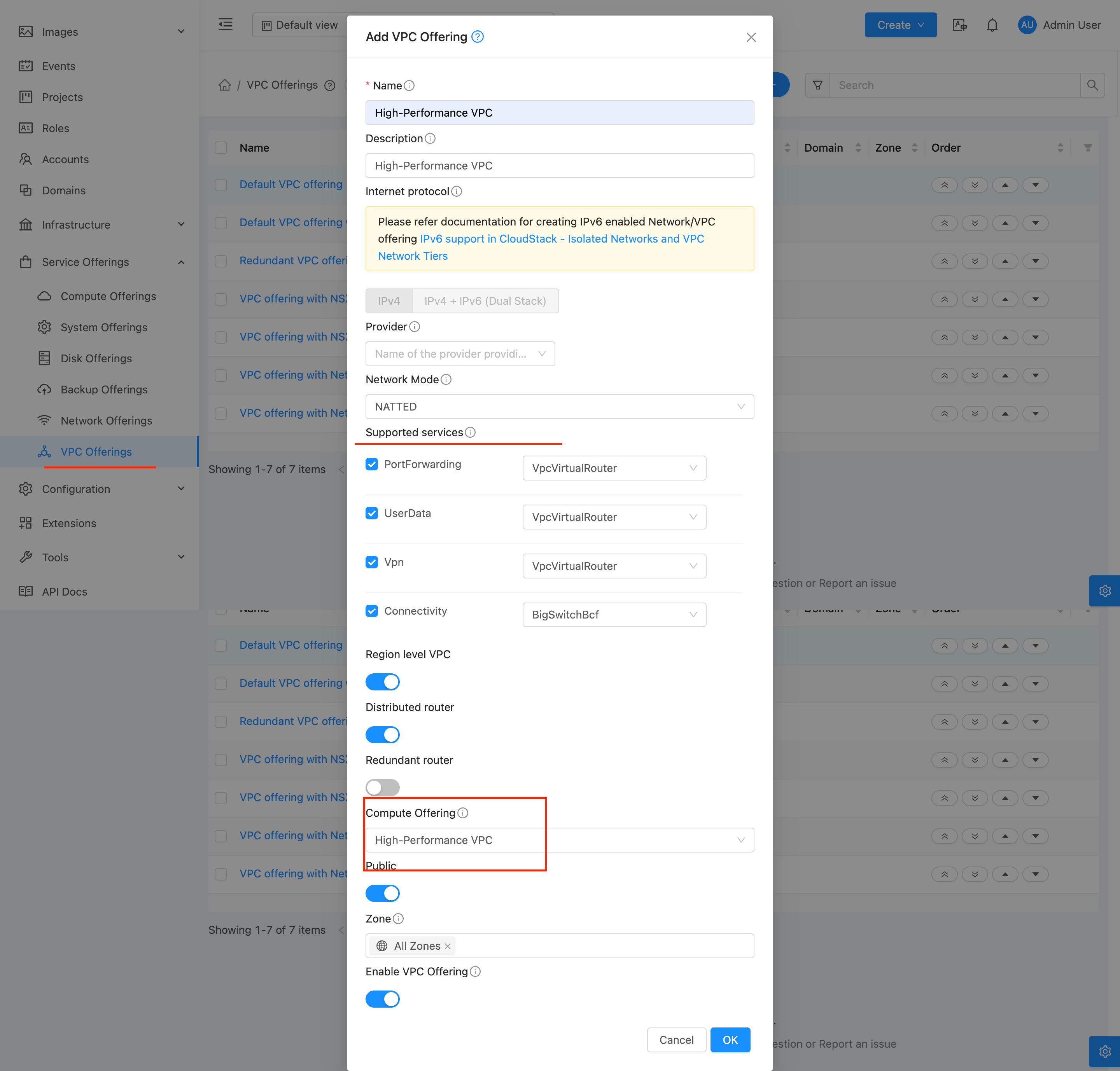
Link each VPC tier to a system service offering and enable the VPC services your customers need.
- Navigate to Network → VPC → VPC Offerings (or Service Offerings → VPC Offering depending on CloudStack UI version)
- Click Add VPC Offering
- Configure the offering — for example:
- Name:
Basic-VPCorHigh-Performance-VPC-200Mbps - Display text: Customer-visible description in CloudStack
- Supported services: Enable every service your customers and CMP require — see Supported services below
- Service offering: Select the system service offering created in Step 1 — this sets virtual router CPU and RAM
- Distributed VPC router: Enable only if your network design supports distributed VPC routers
- Name:
- Set State to Enabled and scope to the target Zone(s)
- Click Add
- Repeat for each VPC tier (for example, Basic VPC vs High-Performance VPC)
Supported services — select all required services
Supported services on the VPC offering define which network services the VPC virtual router provides. Missing a required service cannot be fixed without creating a new offering — CloudStack does not allow material changes after the offering is in use.
Select only the services you need, but do not omit services that CMP or your templates depend on. A common production failure is omitting User Data — VMs provision successfully, but password injection, startup scripts, and Marketplace apps silently fail or error at deploy time.
Recommended services for CMP VPC offerings
Enable the following on every production VPC offering unless you have a specific reason to exclude one:
| Service | Required for CMP | Why it matters |
|---|---|---|
| DHCP | Yes | Assigns IP addresses to VMs in VPC guest tiers |
| DNS | Yes | Provides DNS resolution for guest VMs |
| Source NAT | Yes | Outbound internet access from VPC guest networks |
| Static NAT | Yes | Associates public IPs directly with guest VMs |
| Port Forwarding | Yes | Maps public IP ports to guest VM services — used by CMP for public access workflows |
| Network ACL | Yes | VPC subnet firewall rules managed from the CMP portal |
| User Data | Yes — critical | Delivers startup scripts and metadata to VMs at first boot |
| Load Balancer | Recommended | Required if customers use LB rules on VPC public IPs — must use an acquired public IP, not the VPC Source NAT IP (details) |
| VPN | Optional | Enable only if you offer Site-to-Site or Remote Access VPN on VPC |
User Data — required for templates, Marketplace, and startup scripts
User Data is the most commonly missed service. If it is not enabled on the VPC offering (and on VPC guest network offerings — see below), CloudStack cannot pass initialization data to VMs at deploy time.
CMP depends on User Data for:
- Password-enabled templates — random password generation and delivery
- SSH key injection at provisioning time
- Startup scripts configured on templates
- Marketplace applications — CMP passes installation and configuration data through User Data at first boot
If User Data is not selected when creating the VPC offering, VMs inside the VPC may deploy without errors, but startup scripts and User Data payloads do not run. Marketplace applications that rely on User Data to install software will not work.
The same class of failure occurs on isolated networks when User Data is missing from the network offering. CloudStack may return an error similar to:
Unable to deploy VM as template "ubuntu-test" is password enabled,
but there is no support for UserData service in the default network.
Always enable User Data on VPC offerings and verify it on VPC guest network offerings before go-live.
VPC guest tier network offerings also need User Data
VPC VMs run on guest network tiers inside the VPC. Each tier uses a separate network offering (for example, DefaultIsolatedNetworkOfferingForVpcNetworks).
When creating or selecting network offerings for VPC guest tiers, enable User Data on those offerings as well. A VPC offering with User Data enabled is not sufficient if the guest tier network offering omits it.
| CloudStack object | Where to enable User Data |
|---|---|
| VPC offering | Network → VPC → VPC Offerings → Supported services |
| VPC guest network offering | Service Offerings → Network Offering → Supported services (set For VPC = Yes) |
Refer to Preparing CMP-Compatible Templates for template-side User Data requirements.
Service provider check
After enabling User Data, confirm the ConfigDrive (or your environment's User Data provider) is enabled on the guest physical network: Infrastructure → Zones → [select zone] → Physical Network → Network Service Providers. If the provider is disabled, User Data will fail even when the offering includes the service.
CloudStack does not allow material changes to VPC offerings after they are in use. Plan virtual router sizes and supported services before creating production offerings.
Step 3 — Create VPC guest network offerings
Each VPC tier needs a network offering for guest networks (tiers) inside the VPC. CMP maps this through the VPC Network Offering field on the package.
- Navigate to Service Offerings → Network Offering
- Click Add Network Offering
- Configure the offering — for example:
- Name:
VPC-Network-BasicorDefaultIsolatedNetworkOfferingForVpcNetworks - Guest Type: Isolated
- VPC: Yes — offering is for VPC guest networks only
- Supported services: Enable User Data, DHCP, DNS, Source NAT, Static NAT, Port Forwarding, Network ACL, and Load Balancer as required — see Supported services
- Network Rate: Set the allowed data transfer rate in Mb/s — for example,
200for Basic VPC or1000for High-Performance VPC
- Name:
- Set State to Enabled and scope to the target Zone(s)
- Click Add
- Repeat for each tier if you use different network offerings per package
The VPC Network Offering you select in CMP must include User Data. Without it, VMs deployed inside the VPC will not receive startup scripts, passwords, or Marketplace configuration. See User Data — required for templates, Marketplace, and startup scripts.
Step 4 — Set network rate limits (optional at CloudStack level)
Network rate can be set on the VPC guest network offering in CloudStack (Step 3) and/or entered on the CMP package as Network Rate (Mb/s). Use the same value in both places when you want CloudStack enforcement and customer-facing display to match.
Throughput limits are a common differentiator between Basic VPC and High-Performance VPC packages.
CMP Provider Config prerequisites
During Connecting CMP to CloudStack — Wizard Step 2 — configure:
| Field | Purpose |
|---|---|
| Default VPC ACL Allow ID | CloudStack ACL UUID applied to every new VPC created via CMP. Obtain from CloudStack → Network → VPC → ACL Lists. |
| VPC/Virtual Router service | Must be enabled in Wizard Step 1 before customers can create VPCs |
Set Default VPC ACL Allow ID to the ACL that allows the inbound/outbound rules your customers need by default. Customers can manage VPC ACL rules from the CMP portal after VPC creation.
Configure VPC packages in CMP
After VPC offerings and VPC guest network offerings exist in CloudStack, create a CMP package for each Cloud Provider + Setup + Zone + VPC tier you want to sell.
- Open Settings → Billing Setup → Rate Cards → Default → Packages → Virtual Router/VPC
- Click Add Package (form title: Create Virtual Router/VPC Package)
- Complete each field below in the order shown on the form
- Set Status to Active and save
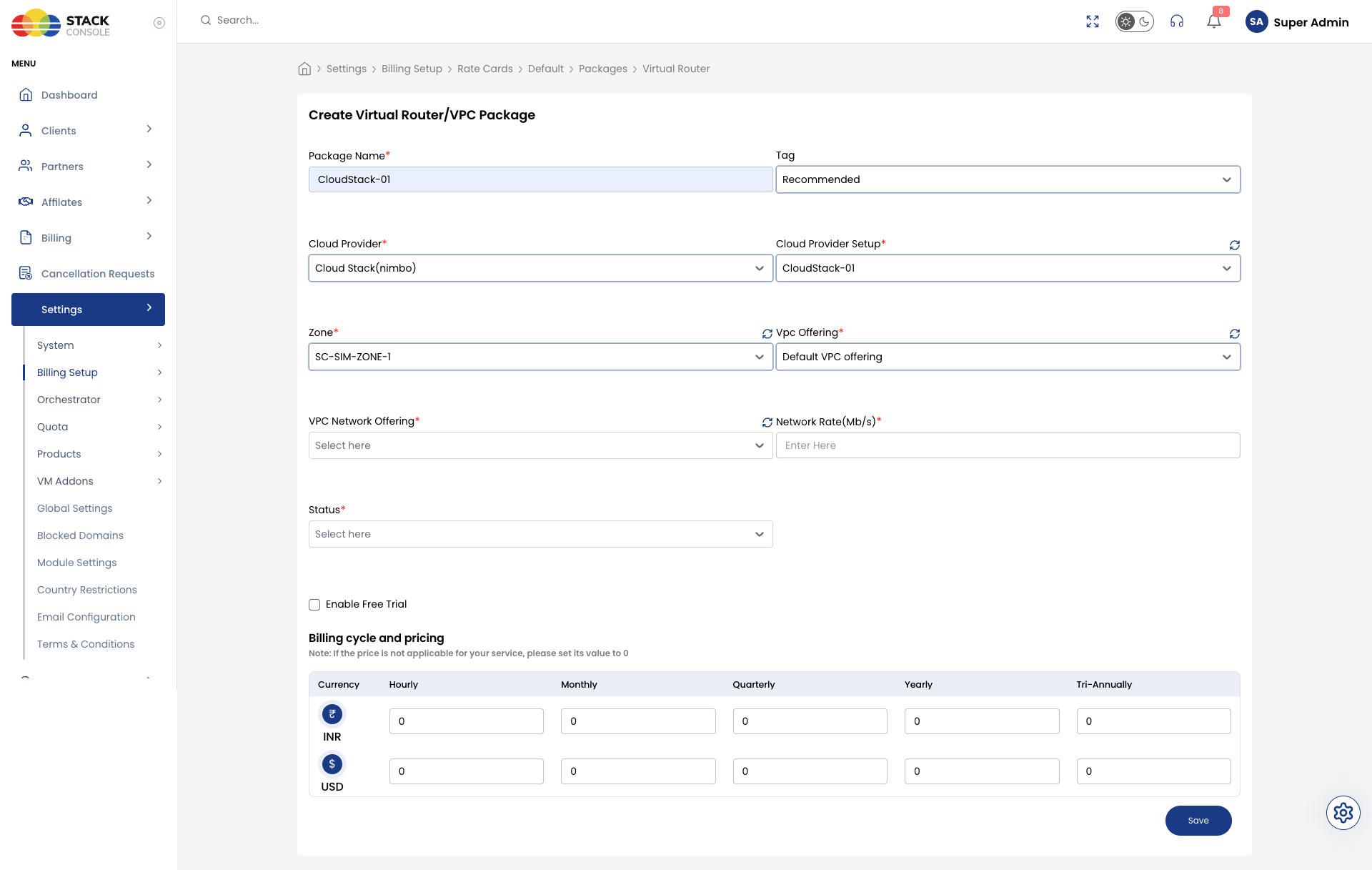
Each field below matches the Create Virtual Router/VPC Package form.
Package Name
Required. Display name for the VPC tier — for example, Basic VPC or High-Performance VPC. Customers see this name when creating a VPC.
Tag
Optional. Assign a tag for filtering or promotional labelling in the customer portal — for example, Recommended.
Tags are CMP-level labels used for representation only. They do not map to CloudStack host or storage tags.
Cloud Provider
Required. Select the orchestrator type — for example, CloudStack (Nimbo).
Cloud Provider Setup
Required. Select the CloudStack instance this package belongs to — for example, CloudStack-01.
Zone
Required. Select the CMP zone where this VPC package is sold. The package appears on the Create VPC page only for this zone.
Create a separate package entry for each zone even when the underlying CloudStack offerings are the same.
Vpc Offering
Required. Select the CloudStack VPC offering CMP uses when provisioning this package — for example, Default VPC offering or Basic-VPC.
The offering must:
- Exist in CloudStack for the selected zone
- Be in Enabled state
- Include all required supported services (especially User Data)
- Link to the intended system service offering for virtual router CPU and RAM
Virtual router sizing is determined entirely in CloudStack by the system service offering linked to this VPC offering — CMP does not pass CPU, memory, or storage values to CloudStack.
VPC Network Offering
Required. Select the CloudStack network offering used for guest networks (tiers) inside the VPC — for example, DefaultIsolatedNetworkOfferingForVpcNetworks.
The offering must:
- Be marked For VPC = Yes in CloudStack
- Be available in the selected zone
- Include User Data and other services required for VM provisioning inside the VPC
- Match the throughput tier you advertise to customers
Network Rate (Mb/s)
Required. Maximum network throughput in megabits per second for this VPC package — for example, 200 for Basic VPC or 1000 for High-Performance VPC.
Enter the rate you want customers to see for this tier. Align this value with the Network Rate set on the selected VPC Network Offering in CloudStack when enforcement at the orchestrator level is required.
Status
Required. Controls package visibility.
| Status | Behaviour |
|---|---|
| Active | Package appears on the customer Create VPC page |
| Inactive | Package is hidden — use while configuring pricing or testing |
Enable Free Trial
Optional. When enabled, customers can provision a VPC from this package under a free-trial policy without immediate billing for the trial period.
Billing cycle and pricing
Required. Set the price for each billing cycle and currency CMP supports.
CMP displays a pricing grid for the currencies enabled at application level. Enter values for the cycles you offer.
Define the monthly price first, then derive hourly using Monthly ÷ (30.5 × 24). See Pricing Formulas for all conversion formulas.
When pricing VPC packages, consider:
- Virtual router resources defined in the CloudStack system service offering linked to the Vpc Offering
- Default Source NAT public IP included with the VPC
- Network Rate (Mb/s) tier — differentiate Basic VPC and High-Performance VPC packages by throughput as well as offering selection
End-to-end mapping example
Goal: Sell a Basic VPC and a High-Performance VPC in zone SC-SIM-ZONE-1.
CloudStack
- Create system service offering
VR-Basic— Domain Router, 1 CPU, 512 MB RAM - Create system service offering
VR-High-Performance— Domain Router, 2 CPU, 2048 MB RAM - Create VPC offering
Basic-VPClinked toVR-Basicwith DHCP, DNS, Source NAT, Static NAT, Port Forwarding, Network ACL, and User Data - Create VPC offering
High-Performance-VPClinked toVR-High-Performancewith all Basic services plus VPN and Load Balancer - Create VPC guest network offering
VPC-Network-Basic— For VPC = Yes, User Data enabled, Network Rate200Mb/s - Create VPC guest network offering
VPC-Network-High-Performance— User Data enabled, Network Rate1000Mb/s - Enable all offerings in zone
SC-SIM-ZONE-1
CMP
- Open Settings → Billing Setup → Rate Cards → Default → Packages → Virtual Router/VPC
- Create package
Basic VPC— Cloud Provider SetupCloudStack-01, ZoneSC-SIM-ZONE-1 - Set Vpc Offering →
Basic-VPC, VPC Network Offering →VPC-Network-Basic, Network Rate (Mb/s) →200 - Create package
High-Performance VPC— Vpc Offering →High-Performance-VPC, VPC Network Offering →VPC-Network-High-Performance, Network Rate (Mb/s) →1000 - Set Tag to Recommended on the default tier if desired
- Enter pricing for each package across billing cycles and currencies
- Set Status to Active and save
Customers selecting a package on Create VPC provision using the selected Vpc Offering and VPC Network Offering. Virtual router CPU and memory come from the CloudStack system service offering linked to the VPC offering — not from CMP package fields.
Customer portal view
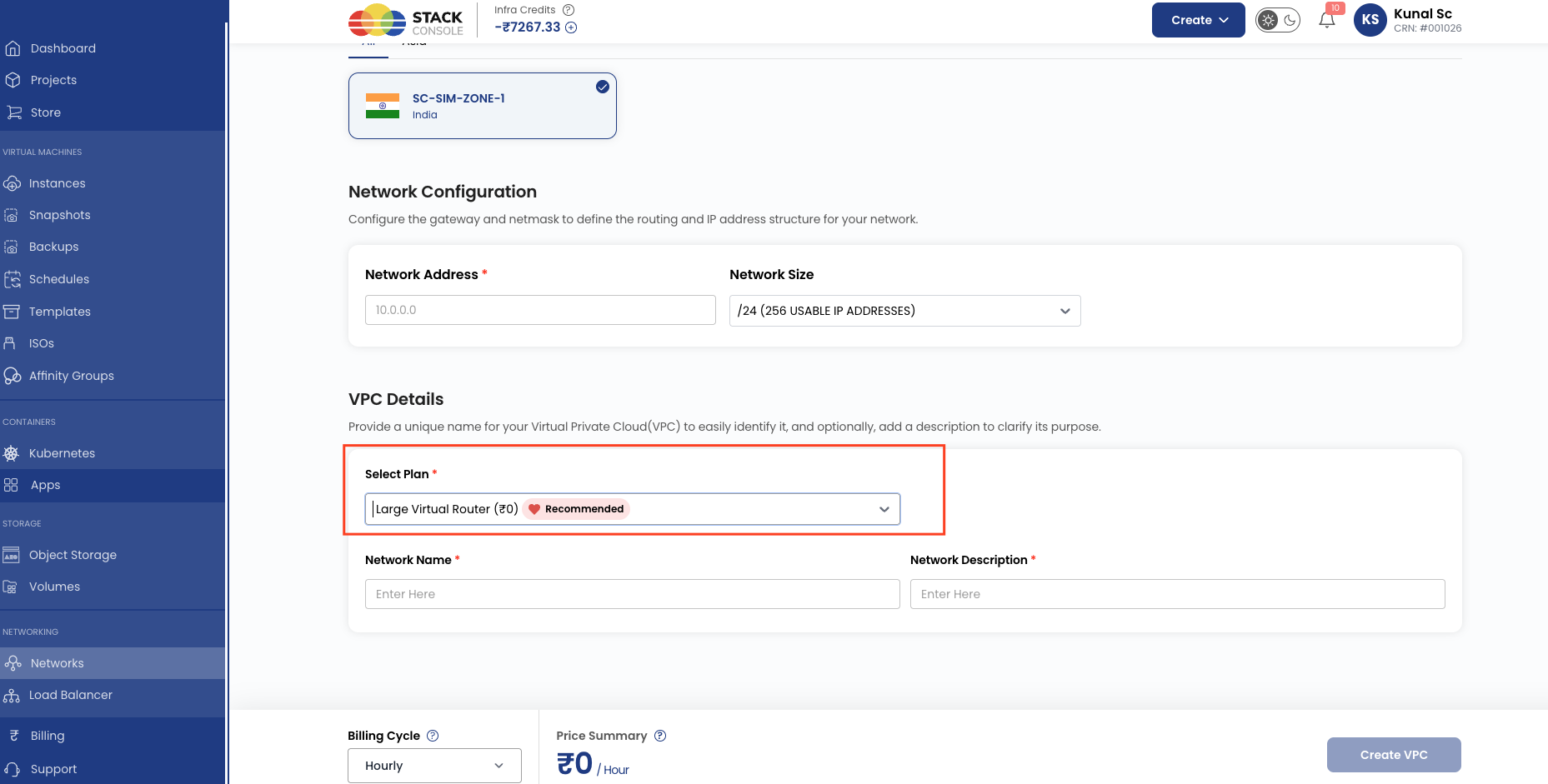
On the Create VPC page, package selection behaviour depends on how many Active VPC packages exist for the customer's zone:
| Packages available | Customer experience |
|---|---|
| Multiple | Customers choose the VPC tier that fits their needs — for example, Basic VPC or High-Performance VPC |
| One | CMP auto-selects the only available package. The package picker is not shown to the customer |
Validation checklist
Before marking a VPC package Active, verify:
- VPC/Virtual Router service is enabled in Cloud Provider Setup (Wizard Step 1)
- Default VPC ACL Allow ID is configured in Provider Config if required
- CloudStack system service offering exists for the target VPC tier (Basic or High-Performance)
- CloudStack VPC offering exists, is Enabled, scoped to the correct zone, and includes all required supported services
- Vpc Offering in CMP maps to the correct CloudStack VPC offering for the zone
- VPC Network Offering in CMP maps to a VPC guest network offering with User Data enabled
- ConfigDrive (or User Data provider) is enabled on the guest physical network
- Network Rate (Mb/s) matches the throughput tier on the selected network offering
- Pricing is configured for each supported currency and billing cycle
- Global quotas allow sufficient Virtual Router / VPC count for customer accounts
- CloudStack VPC and network quota limits are set high enough to avoid provisioning failures — see Quota Management (ACS)
Related
- CloudStack Packages
- Connecting CMP to CloudStack — Provider Config and VPC ACL
- Configuring Zones in CMP
- Quota Management (ACS)
- Global Quotas
- Pricing Formulas
- Apache CloudStack — System Service Offerings
- Preparing CMP-Compatible Templates
- Apache CloudStack — Configuring a VPC
- Apache CloudStack — createVPCOffering API