Unit Pricing
Unit Pricing defines the per-unit monthly rates CMP uses to calculate bills when customers provision resources through custom packages — configurations they enter manually instead of selecting a predefined package tier.
CMP takes unit prices for vCPU, memory, storage, and IP address per month, then derives hourly and other billing cycles from those values to produce the customer's final charge. When bandwidth billing is enabled, an additional 1 GB Bandwidth per Month column appears on the form for usage-based network charges.
When setting unit prices, ensure that a custom configuration costs equal to or greater than the equivalent predefined package.
Example: A predefined package with 2 vCPU + 2 GB RAM costs $10/month (or the equivalent hourly rate). If a customer enters 2 vCPU + 2 GB in custom package fields, the unit-pricing calculation must total ≥ $10/month — otherwise customers will always choose custom over predefined to get a lower price.
Apply the same rule for storage — custom storage unit pricing must be ≥ predefined Volumes packages for equivalent sizes.
Ensure the following are already configured:
- Storage Settings exist for the target zone and storage category, with Custom Compute Offering ID and Custom Disk Offering ID set
- Predefined VM packages and Volumes packages are configured for comparison pricing
- Enable Override Disk Offering is Yes in Cloud Provider Setup if customers select custom root disk sizes
- Custom / unconstrained compute and disk offerings exist in CloudStack — see Custom unconstrained offering
CMP path: Settings → Billing Setup → Rate Cards → Default → Packages → Unit Pricing
How unit pricing works
When custom packages are enabled, customers enter their required configuration (vCPU, RAM, storage, and so on) instead of picking a predefined tier. CMP calculates the price from your unit rates:
Custom monthly price = (vCPU × 1 Core vCPU per Month)
                     + (RAM GB × 1 GB Memory per Month)
                     + (Storage GB × 1 GB Storage per Month)
                     + (IP count × 1 IP Address per Month)   [if applicable]
Bandwidth is charged separately based on actual usage when bandwidth billing is enabled — see Bandwidth below.
CMP derives hourly and other billing cycle amounts from the monthly unit prices using standard pricing formulas.
Customer selects Custom → Enters vCPU, RAM, storage → CMP applies unit prices → Final bill
| Component | Unit price field | Used when |
|---|---|---|
| vCPU | 1 Core vCPU per Month | Customer enters custom CPU count |
| Memory | 1 GB Memory per Month | Customer enters custom RAM in GB |
| Storage | 1 GB Storage per Month | Customer enters custom root or data disk size |
| IP Address | 1 IP Address per Month | Custom package includes a public IP charge |
| Bandwidth | 1 GB Bandwidth per Month | Only when bandwidth billing is enabled — usage-based charge on traffic beyond the free threshold |
Bandwidth (conditional)
The 1 GB Bandwidth per Month column appears on the Unit Pricing form only when bandwidth billing is enabled — typically when the Bandwidth service is enabled in Cloud Provider Setup (Wizard Step 1).
Bandwidth is a usage-based service — no fixed package is provisioned. CMP charges based on actual network traffic from CloudStack:
- CloudStack tracks incoming and outgoing traffic at the network level via the usage service
- CMP reads this usage data and applies the 1 GB Bandwidth per Month unit price
- Reference: CloudStack Usage Service deep dive
Bandwidth is not part of the custom VM configuration total at provisioning time. Charges apply to traffic beyond the Free Bandwidth Threshold (GB) set in Cloud Provider Setup (Provider Config). The free allowance resets to zero at the start of each month — only usage above the threshold is billed.
Example:
- Free bandwidth threshold: 1,000 GB/month
- Customer uses 1,200 GB in the month → 200 GB is billed at the bandwidth unit rate
| Mode | Customer experience | Pricing source |
|---|---|---|
| Predefined package | Selects a fixed tier — for example, 2 vCPU / 2 GB RAM | Virtual Machine or Volumes package price |
| Custom package | Enters own vCPU, RAM, storage values | Unit Pricing rates for the zone and storage category |
Configure Unit Pricing in CMP
Create unit pricing for each Cloud Provider + Setup + Zone + Storage Category combination where custom packages are offered.
- Open Settings → Billing Setup → Rate Cards → Default → Packages → Unit Pricing
- Complete each field below
- Set Status to Active and save
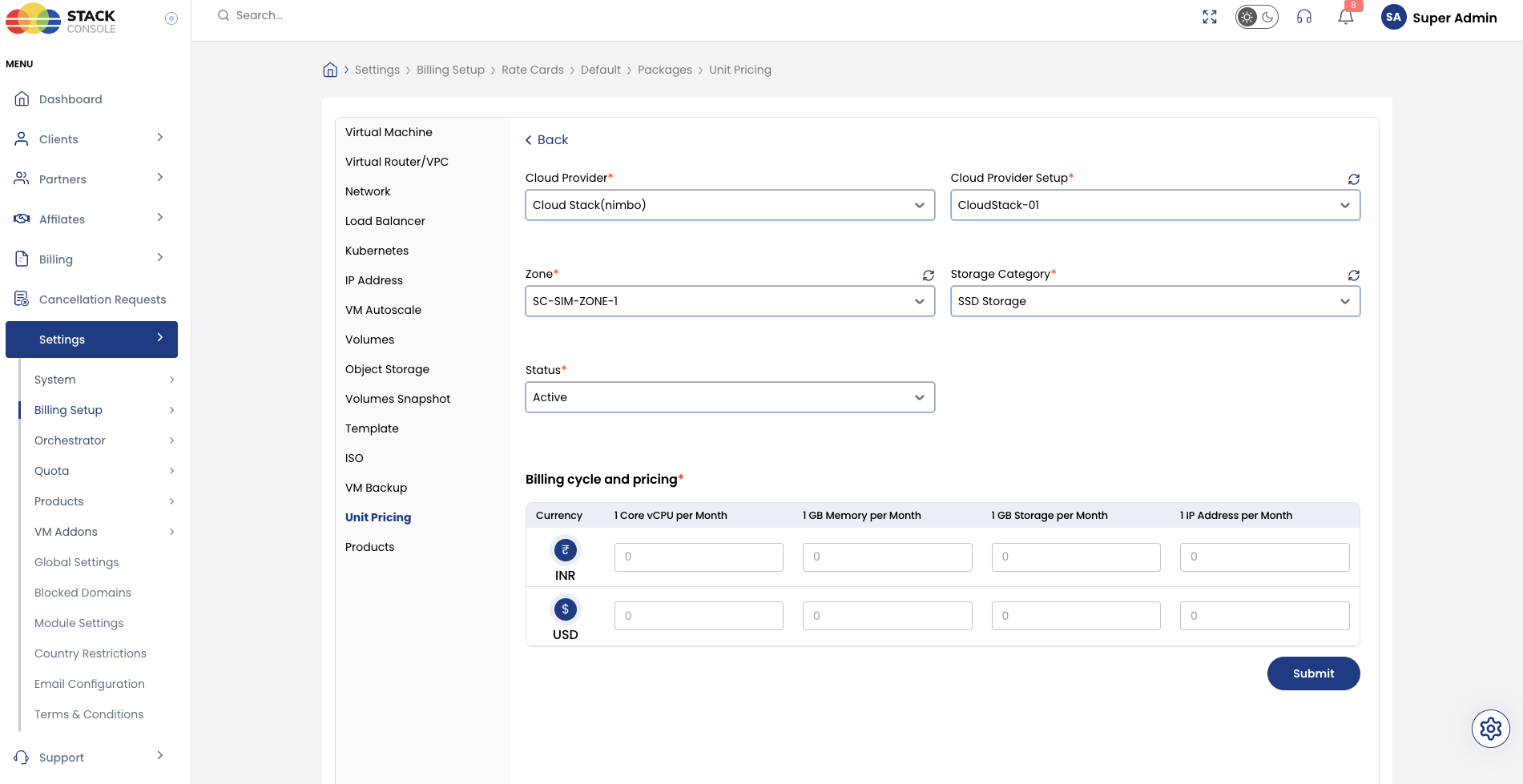
Each field below matches the Unit Pricing form.
Cloud Provider
Required. Select the orchestrator type — for example, CloudStack (Nimbo).
Cloud Provider Setup
Required. Select the CloudStack instance this pricing belongs to — for example, CloudStack-01.
Zone
Required. Select the CMP zone where these unit prices apply — for example, SC-SIM-ZONE-1.
Storage Category
Required. Select the storage tier — for example, SSD Storage.
Must match a configured Storage Settings entry for this zone. Unit pricing is scoped per zone + storage category because custom storage charges depend on the storage tier.
Status
Required. Controls whether unit pricing is active for custom package calculations.
| Status | Behaviour |
|---|---|
| Active | Custom package pricing uses these unit rates in this zone and storage category |
| Inactive | Hidden — use while configuring or testing |
Billing cycle and pricing
Required. Enter the monthly unit price for each resource type and currency CMP supports.
| Column | Description |
|---|---|
| 1 Core vCPU per Month | Price per CPU core per month |
| 1 GB Memory per Month | Price per GB of RAM per month |
| 1 GB Storage per Month | Price per GB of disk storage per month |
| 1 IP Address per Month | Price per public IP per month |
| 1 GB Bandwidth per Month | Price per GB of network traffic per month — shown only when bandwidth billing is enabled |
Enter values for each currency row — for example, INR and USD. CMP derives hourly rates from the monthly unit prices. The bandwidth column is not present unless Bandwidth billing is enabled in Cloud Provider Setup.
After entering unit prices, calculate a few sample custom configurations and compare them to your predefined VM and Volumes packages. See Pricing check example below.
Pricing check example
Predefined package: 2 vCPU + 2 GB RAM = $10/month
Unit pricing you set:
| Unit | Price/month |
|---|---|
| 1 Core vCPU | $4.00 |
| 1 GB Memory | $2.00 |
Custom configuration: Customer enters 2 vCPU + 2 GB RAM
Custom total = (2 × $4.00) + (2 × $2.00) = $12.00/month ✅ ≥ $10 predefined
If unit prices were $3/vCPU and $1/GB RAM, the custom total would be $8/month — below the predefined package. Customers would always choose custom. Adjust unit prices upward until equivalent custom configurations match or exceed predefined pricing.
End-to-end example
Goal: Enable custom VM provisioning in zone SC-SIM-ZONE-1 on SSD storage, with unit pricing that does not undercut the 2vCore-2GB Memory predefined package at $10/month.
CloudStack
- Create custom unconstrained compute offering (any CPU/RAM)
- Create custom unconstrained SSD disk offering with storage tag
ssd
CMP — Storage Settings
- Configure SSD Storage for zone
SC-SIM-ZONE-1 - Set Custom Compute Offering ID and Custom Disk Offering ID
CMP — Predefined package (for comparison)
- Create VM package
2vCore-2GB Memoryat $10/month
CMP — Unit Pricing
- Open Packages → Unit Pricing
- Set Cloud Provider CloudStack (Nimbo), Cloud Provider Setup
CloudStack-01, ZoneSC-SIM-ZONE-1, Storage Category SSD Storage - Enter unit prices — for example, 1 Core vCPU
$4.00, 1 GB Memory$2.00, 1 GB Storage$0.10per month - Set Status to Active and save
- Verify: 2 vCPU + 2 GB custom = $12/month ≥ $10 predefined
Customer portal view
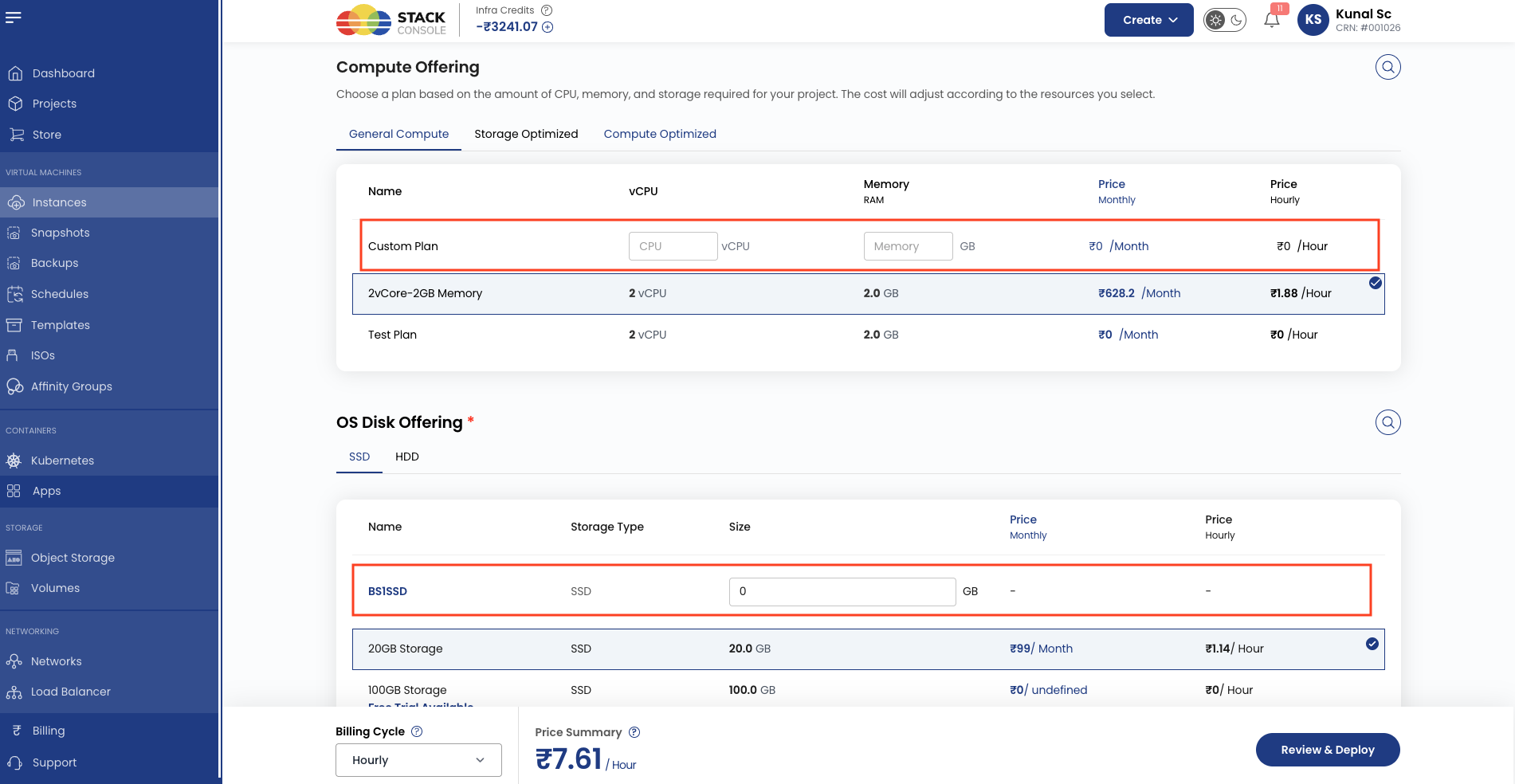
When custom packages are enabled, customers see a Custom option on Create Instance (and related flows) alongside predefined packages. They enter vCPU, RAM, and storage values; CMP displays the calculated price based on unit pricing for the selected zone and storage category.
Validation checklist
Before marking Unit Pricing Active, verify:
- Storage Settings exist for the zone and Storage Category
- Custom Compute Offering ID and Custom Disk Offering ID are configured in Storage Settings
- Predefined VM and Volumes packages exist for price comparison
- Unit prices are set for each supported currency
- Sample custom configurations total ≥ equivalent predefined package prices
- Enable Override Disk Offering is Yes if custom root disk sizing is offered