IP Address Packages
IP Address packages control how public IP addresses are billed when customers provision VMs with public access or purchase standalone reserved IPs.
Unlike compute packages, IP packages do not map to a CloudStack offering ID. CMP acquires public IPs from CloudStack's IP pool and applies the pricing defined in the IP Address package for the relevant zone.
CMP allows only one IP Address package per Cloud Provider Setup + Zone combination. You cannot create multiple IP packages (for example, separate tiers or promotional packages) for the same setup and zone.
Free trials are not applicable to IP Address packages. The IP Address package form does not include Enable Free Trial — public IPs are always billed from the moment they are acquired or assigned. This is a common customer request; advise customers that free trial promotions apply to compute and other service packages, not to IP addresses.
Ensure the following are already configured:
- Cloud Provider Setup is connected, with IP Address enabled in Wizard Step 1
- Zones are mapped in CMP
- Public IP ranges are configured in CloudStack for the target zone
- You have decided whether IPs are included in VM package pricing or billed separately — see Billing modes below
CMP path: Settings → Billing Setup → Rate Cards → Default → Packages → IP Address
How IP billing works in CMP
Customers interact with public IPs in two ways:
| Scenario | Description |
|---|---|
| IP at VM creation | Customer provisions a VM and selects a public IP during Create Instance |
| Reserved / standalone IP | Customer purchases a public IP separately and assigns it to a VM later |
CMP acquires the IP from CloudStack and bills according to your IP package pricing and global billing mode.
Billing modes
CMP supports two global approaches for public IP charges at VM creation:
| Mode | Configuration | Behaviour |
|---|---|---|
| IP included in VM package | plan_ip_billing = false (default) | Public IP cost is rolled into the VM package price — no separate IP line item -if customer opts for public IP address while creating VM |
| IP charged separately | plan_ip_billing = true | A separate IP charge applies whenever a VM is created with a public IP |
To enable separate IP billing: Set plan_ip_billing = true in Admin Panel → Global Settings. See Initial Super Admin Setup.
The plan_ip_billing flag applies globally. CMP does not currently support a model where bundled IPs are free but reserved IPs are charged. Either all public IPs at VM creation follow Mode 1 or all follow Mode 2.
Reserved / standalone IPs purchased separately are always billed through the IP Address package regardless of plan_ip_billing.
Reserved vs bundled IPs
| Type | How acquired | Billing |
|---|---|---|
| Bundled IP | Selected during VM creation with a public IP | Per plan_ip_billing setting — included in VM or charged separately |
| Reserved / standalone IP | Purchased from the IP Address section and assigned manually | Always billed via IP Address package |
Billing lifecycle
- IP billing starts when the IP is assigned to a VM or reserved
- IP billing continues even when the VM is stopped — unlike CPU and RAM, which pause under stoppable-service billing
- IP billing stops when the IP is released or deleted
Source NAT IP reuse (isolated networks)
On isolated networks, CMP reuses the network's Source NAT public IP for the first VM that requests public access:
- First VM with public access — CMP uses the isolated network's Source NAT IP and associates it via port forwarding. The IP is charged per your Network package.
- Additional VMs with public access (Create Instance) — CMP acquires a new public IP and charges for it. Association uses Static NAT or Port Forwarding per Cloud Provider Setup Default Network Strategy. Manual IP association outside Create Instance is chosen by the customer. On isolated networks, the first (Source NAT) IP always uses Port Forwarding — see Networks — Isolated Networks and Source NAT.
- VM deletion (Source NAT case) — CMP disassociates the IP from the VM but retains it on the network.
- Reuse — If the Source NAT IP is not associated with any VM, CMP reuses it for the next VM that requests public access.
The VPC Source NAT IP cannot be used for Vm or any load balancer rules in CloudStack. Using Source NAT will fail at the CloudStack layer. See Load Balancer — VPC Source NAT and load balancing.
CloudStack prerequisites
Public IPs must be available in CloudStack before customers can acquire them through CMP.
- Log in to the CloudStack UI with admin privileges
- Navigate to Infrastructure → Zones → [your zone] → Physical Networks
- Confirm public IP ranges are configured and have available addresses
- Verify VLAN or network setup allows IP allocation for isolated and VPC networks
- Test manual IP acquisition from the CloudStack UI before enabling customer self-service
No separate CloudStack "IP offering" is required — CMP manages IP allocation through the CloudStack API.
Configure IP Address packages in CMP
Create one IP Address package per Cloud Provider + Setup + Zone where you want defined IP pricing. CMP does not support multiple IP packages for the same setup and zone, and free trials cannot be enabled on IP Address packages.
- Open Settings → Billing Setup → Rate Cards → Default → Packages → IP Address
- Click Add Package (form title: Create IP Address Package)
- Complete each field below in the order shown on the form
- Set Status to Active and save
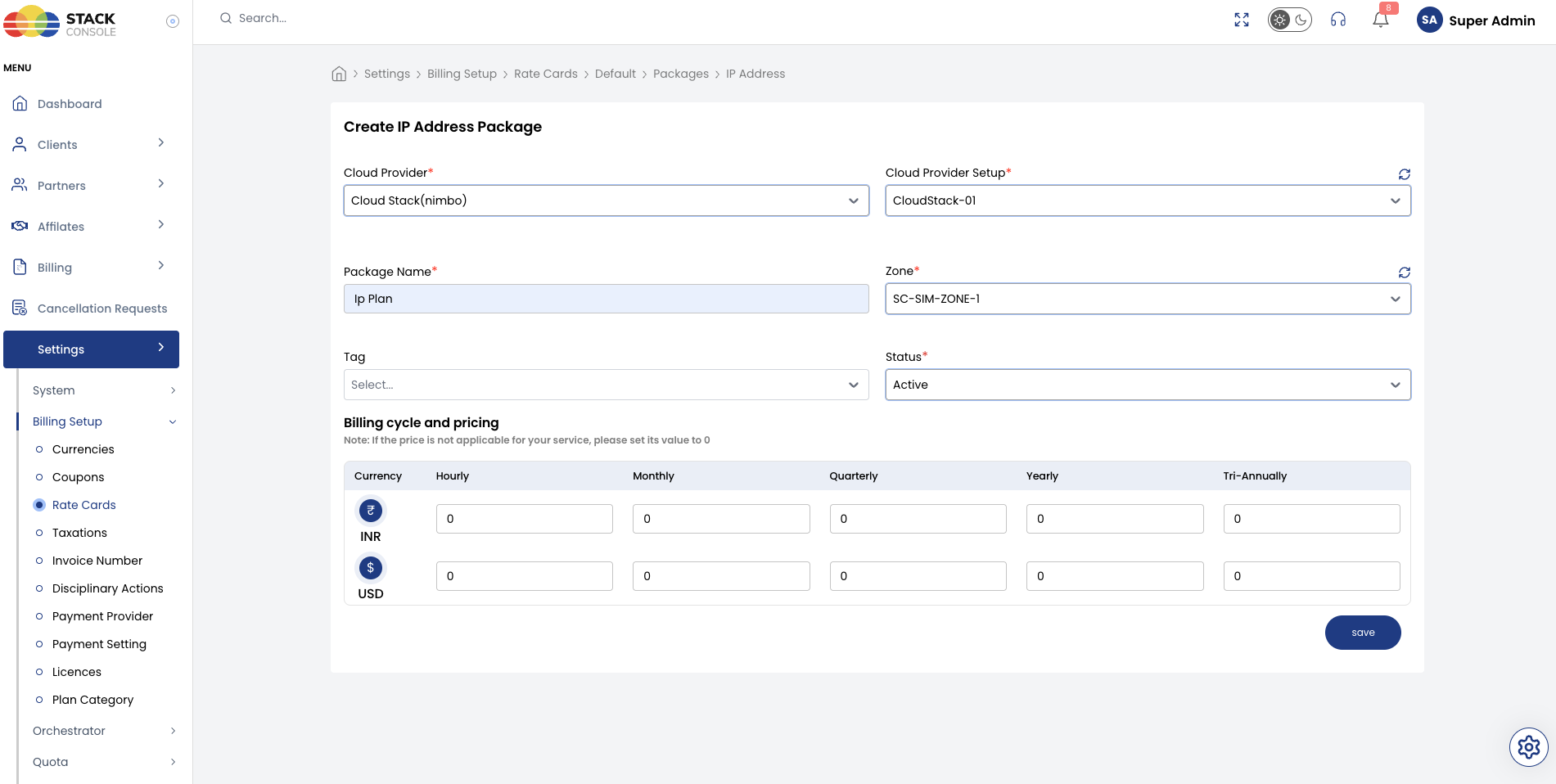
Each field below matches the Create IP Address Package form.
Cloud Provider
Required. Select the orchestrator type — for example, CloudStack (Nimbo).
Cloud Provider Setup
Required. Select the CloudStack instance this package belongs to — for example, CloudStack-01.
CMP supports one IP Address package per Cloud Provider Setup + Zone. Create separate entries if you operate multiple setups or zones.
Package Name
Required. Display name for the IP service — for example, Ip Plan or Public IP Address.
Zone
Required. Select the CMP zone where this IP pricing applies. IP charges are scoped to the zone where the IP is acquired — for example, SC-SIM-ZONE-1.
Tag
Optional. Assign a tag for filtering or promotional labelling in the customer portal.
Tags are CMP-level labels used for representation only. They do not map to CloudStack host or storage tags.
Status
Required. Controls package visibility.
| Status | Behaviour |
|---|---|
| Active | IP pricing applies when customers acquire public IPs in this zone |
| Inactive | Hidden — use while configuring pricing or testing |
Billing cycle and pricing
Required. Set the price for each billing cycle and currency CMP supports.
IP addresses are typically priced per IP per month or per IP per hour. Enter values for each billing cycle you offer.
Define the monthly price first, then derive hourly using Monthly ÷ (30.5 × 24). See Pricing Formulas.
When plan_ip_billing = false, this package pricing applies primarily to reserved / standalone IPs. When plan_ip_billing = true, it also applies to IPs acquired at VM creation.
The Create IP Address Package form does not include Enable Free Trial. Public IPs are always billed from acquisition — see the critical note at the top of this page.
End-to-end example
Goal: Charge $5/month per public IP separately from VM pricing in zone SC-SIM-ZONE-1.
CMP global settings
- Set
plan_ip_billing = truein Global Settings
CMP package
- Open Packages → IP Address → Add Package
- Set Cloud Provider CloudStack (Nimbo), Cloud Provider Setup
CloudStack-01, Package NameIp Plan, ZoneSC-SIM-ZONE-1 - Enter pricing — for example, USD monthly
5.00, hourly derived automatically - Set Status to Active and save
Customers creating a VM with a public IP or purchasing a reserved IP are charged per this package.
Customer portal view
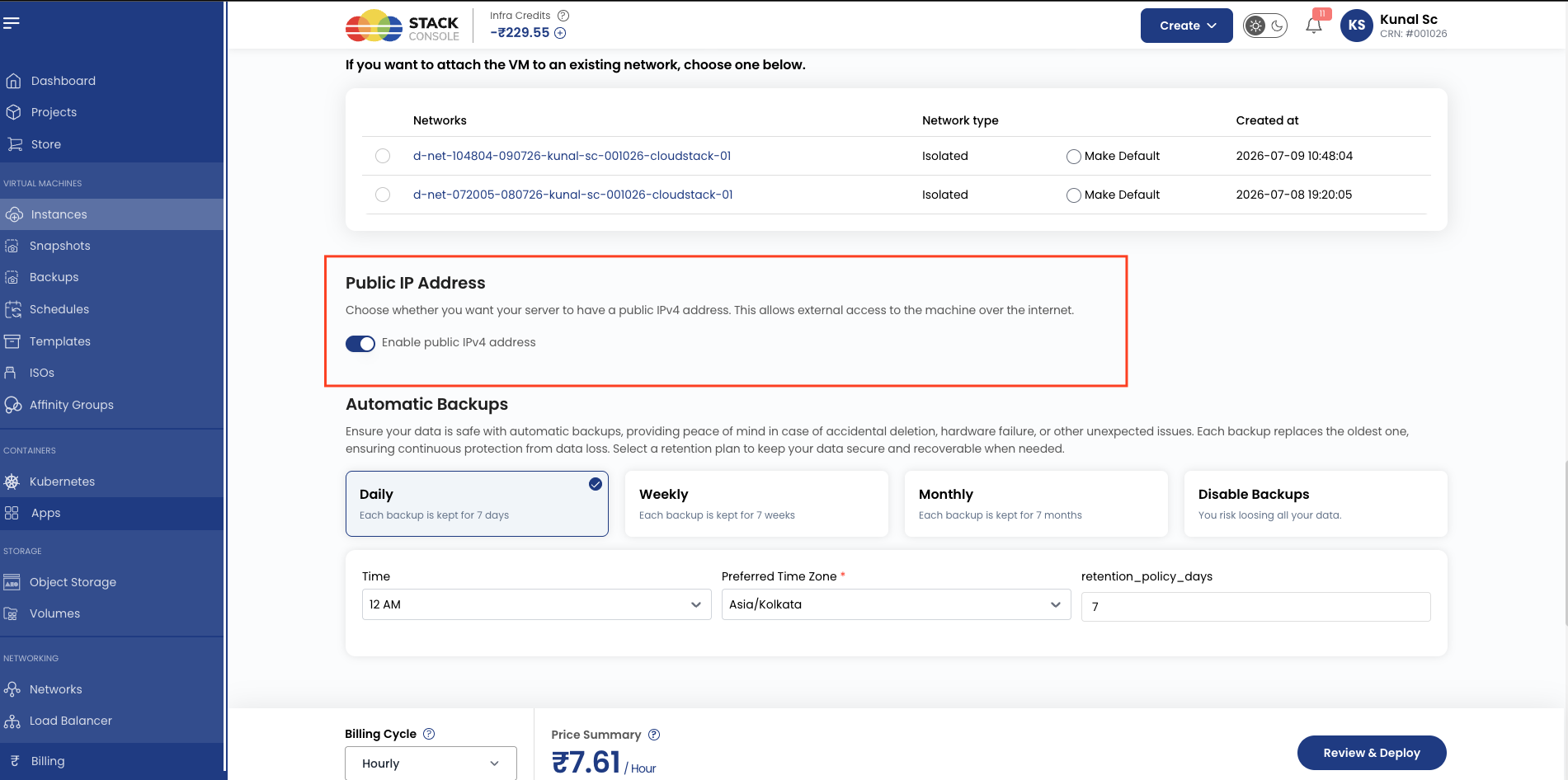
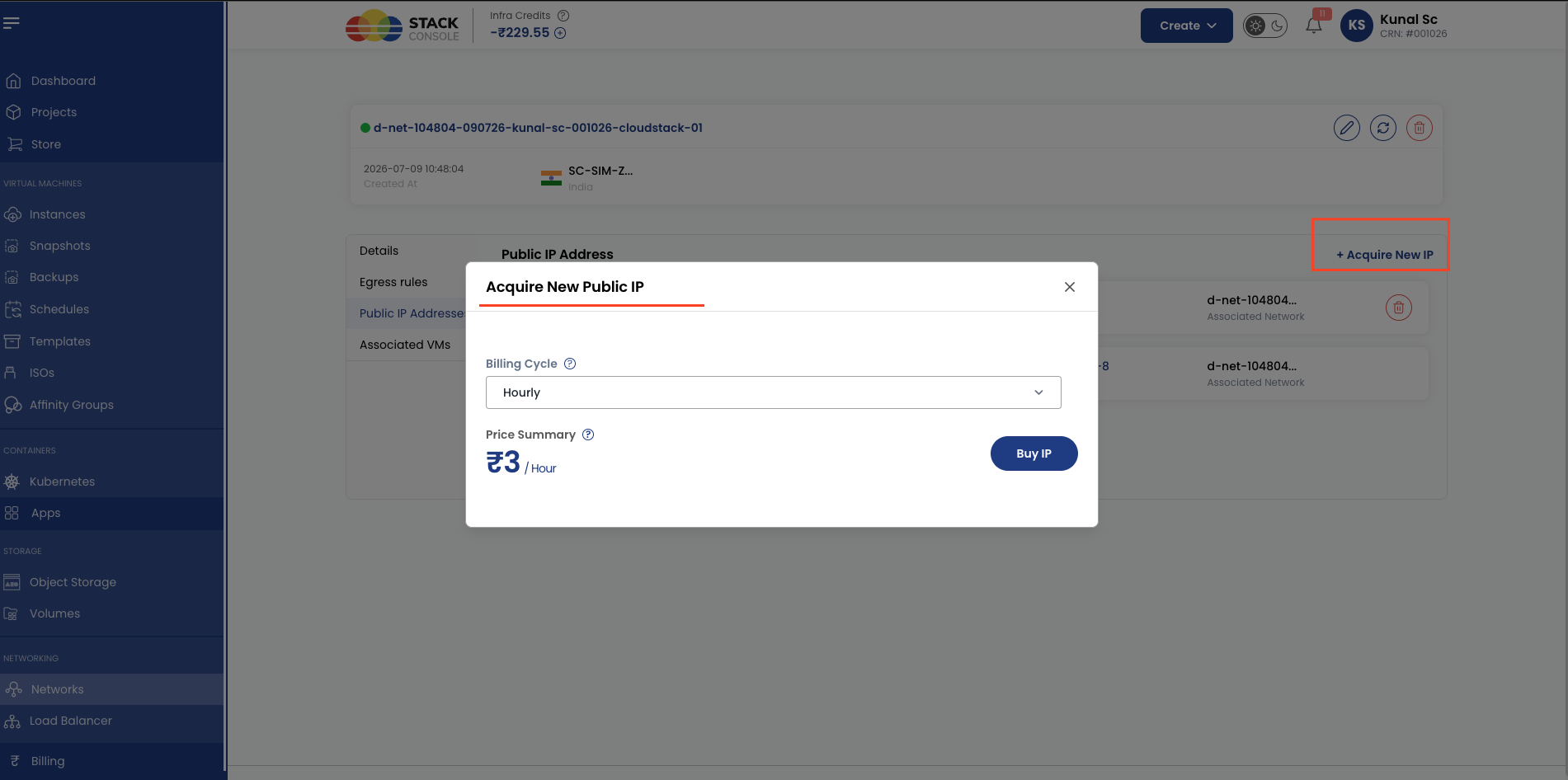
Customers acquire IPs during Create Instance (public IP option) or from the IP Address section for reserved IPs.
Customers often ask whether public IPs can be included in a free trial. They cannot. IP Address packages do not support free trials — any public IP acquired or assigned is billed immediately per the zone's IP package pricing, even if the associated VM is on a free trial.
At the time of VM Creation
From network section
Validation checklist
Before marking an IP Address package Active, verify:
- IP Address service is enabled in Cloud Provider Setup (Wizard Step 1)
- Public IP ranges are configured and have available addresses in CloudStack for the target zone
plan_ip_billingglobal setting matches your intended billing model- Pricing is configured for each supported currency and billing cycle
- Global quotas allow sufficient IP Address count per account
- CloudStack IP quota limits are set high enough — see Quota Management (ACS)