VPC Network
A VPC (Virtual Private Cloud) in Apache CloudStack is a private, isolated part of the cloud with its own virtual network topology. Customers create VPCs in CMP by selecting a VPC package that maps to CloudStack VPC Offering and VPC Network Offering values.
- This page — how VPC works in CloudStack and how CMP exposes it (tiers, ACLs, Source NAT, VPN/private gateway overview, limitations).
- Admin package setup — Virtual Router/VPC packages.
- Provider Config — Connecting CMP to CloudStack (Default VPC ACL Allow ID, Default Network Strategy).
What is a VPC?
In CloudStack, a VPC lets you:
- Define a super CIDR (for example
10.0.0.0/16) for all guest tiers - Create one or more network tiers (subnets) inside that CIDR
- Use a single VPC virtual router for routing, DHCP, DNS, Source NAT, ACLs, and optional VPN / load balancing
CloudStack reference: Configuring a Virtual Private Cloud.
| Building block | Role |
|---|---|
| VPC | Isolated private cloud for one account / project, with a super CIDR |
| Network tier | Guest subnet inside the VPC (own VLAN segment and CIDR); one ACL list per tier |
| VPC virtual router | System VM that connects tiers, public gateway, VPN, and NAT |
| Public gateway / Source NAT | Outbound internet; one Source NAT public IP allocated when the VPC is created |
| Network ACL | Numbered allow/deny rules for ingress/egress on a tier |
| Private gateway | Optional route to a private / enterprise network |
| VPN gateway | Optional site-to-site VPN endpoint for the VPC |
| Isolated Network | VPC | |
|---|---|---|
| Structure | Single guest network | Super CIDR + one or more tiers |
| Virtual router | One VR per isolated network | One VPC VR for the whole VPC |
| Offerings | Network offering | VPC offering + VPC guest network offerings |
| Firewall model | Isolated network firewall at public IP level | Network ACL on tiers |
| CMP packages | Network packages (when billing enabled) | Virtual Router/VPC |
See Isolated Network.
How CMP provisions a VPC
- Enable VPC/Virtual Router in Cloud Provider Setup (Wizard Step 1)
- Set Default VPC ACL Allow ID in Provider Config (Wizard Step 2) so new VPCs get a usable default ACL
- Create CloudStack system service offerings, VPC offerings, and VPC guest network offerings (with User Data and Network ACL)
- Create CMP Virtual Router/VPC packages per zone/tier
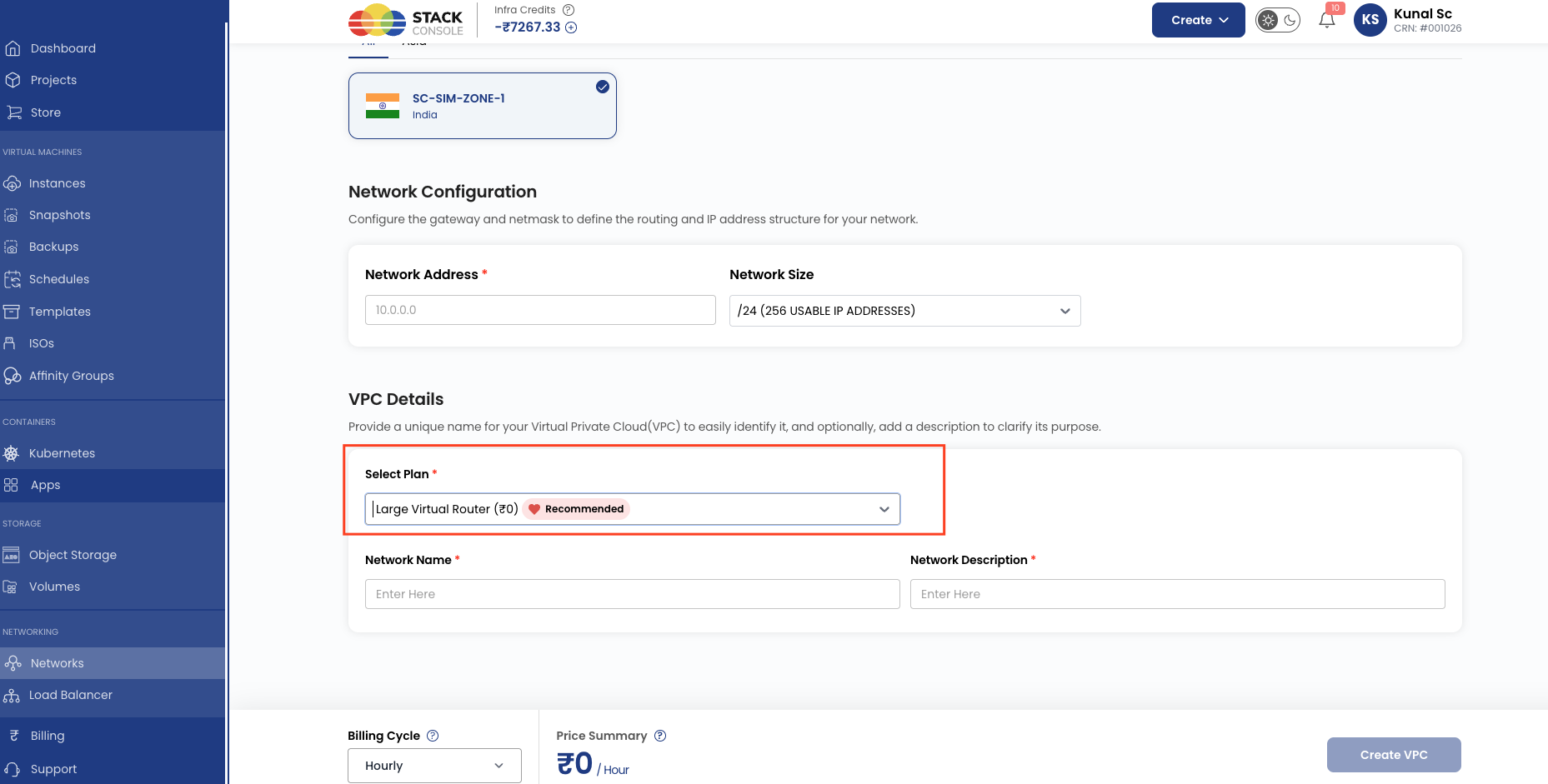
- Customer opens Create VPC, selects a package (or CMP auto-selects when only one package exists), and CMP creates the VPC via CloudStack APIs
CMP VPC package
  → CloudStack VPC Offering (+ system service offering = VR size)
  → VPC created (Source NAT IP allocated)
  → Customer adds tiers using VPC Network Offering
  → ACL list applied per tier (default from Default VPC ACL Allow ID, then custom rules)
Default VPC ACL Allow ID
| Field | Purpose |
|---|---|
| Default VPC ACL Allow ID | CloudStack ACL list UUID applied when CMP creates a new VPC |
Obtain the UUID from CloudStack → Network → VPC → ACL Lists (typically a default_allow-style list, or a custom allow list you maintain). Customers can replace or edit ACL rules in the CMP portal after creation.
Network tiers
- Each tier is an isolated guest network inside the VPC with its own CIDR (must be unique and inside the VPC super CIDR)
- Tiers do not freely reach each other by default — Network ACL rules control tier-to-tier and tier-to-public traffic
- Only one tier in a VPC can use an LB-enabled network offering (CloudStack limitation)
- A public IP attached to one tier for Static NAT / Port Forwarding / LB cannot be reused for another tier’s services at the same time
Customers add tiers from the VPC details view in CMP after the VPC exists.
Source NAT and public IPs on VPC
- When a VPC is created, CloudStack allocates a Source NAT public IP. It is released only when the VPC is deleted.
- The VPC Source NAT IP cannot be used for VM association or load balancer rules. Customers must acquire a separate public IP (for example Static NAT) for LB or dedicated VM public access.
- Details: Load Balancer — VPC Source NAT and IP Address packages.
For automated public IP attach during Create Instance, see Default Network Strategy. Manual IP association outside create-instance is chosen by the customer.
Network ACL (VPC firewall)
Network ACL is the CloudStack / CMP control plane for allow/deny traffic on a VPC tier. The VPC offering and guest network offerings must include the Network ACL service.
How ACL works in CloudStack
| Concept | Behaviour |
|---|---|
| Scope | Rules apply to the network tier (subnet), not to an individual VM as a first-class target |
| Evaluation | Numbered rules, lowest number first |
| Traffic type | Ingress or Egress |
| Action | Allow or Deny |
| Protocol / ports | TCP, UDP, ICMP, ALL (plus ICMP type/code when applicable) |
| CIDR field | Single cidrlist on the API — Source CIDR for Ingress, Destination CIDR for Egress |
| Stateful | ACL rules in CloudStack are stateful (return traffic for an allowed flow follows connection state) |
| Ingress vs egress | Not mirrored — an egress deny-all does not block replies to an allowed ingress connection |
Official wording: “The CIDR acts as the Source CIDR for the Ingress rules, and Destination CIDR for the Egress rules.” — CloudStack VPC ACL.
API reference: createNetworkACL parameters include protocol, traffictype, action, cidrlist, startport / endport, icmpcode / icmptype, number, aclid / networkid. There are no separate sourcecidr + destinationcidr (or sourceip / destinationip) parameters in current CloudStack ACL APIs.
What you can express today
| Supported today | Example |
|---|---|
| Allow/deny by protocol and port | Allow TCP 443 |
| Scope CIDR as source (ingress) or destination (egress) — one CIDR role per rule | Ingress source 192.168.28.0/24, or egress destination 10.0.0.0/8 |
| Subnet ↔ subnet (tier) control | Tier A ACL egress allow to Tier B CIDR |
| Partial host match via /32 in the single CIDR slot | Egress destination 192.168.26.6/32 (all hosts on this tier may reach that host, subject to other rules) |
What you cannot express as classic host-level ACL
CloudStack VPC ACL does not provide independent source host and destination host fields on the same rule.
Desired classic rule (not supported as two independent ends):
Allow any TCP traffic on port 53 from subnet
192.168.28.0/24to host192.168.26.6.
Most granular rule today:
Direction + one CIDR (
cidrlist) + protocol + port (for example allow egress TCP 53 from this tier to192.168.26.6/32).
That egress /32 targets the destination host for traffic leaving the tier, but it does not simultaneously constrain source to a specific host and destination to another specific host as separate fields. Ingress /32 constrains source only for traffic entering the tier.
| Question | Answer (CloudStack + CMP model) |
|---|---|
| Does ACS natively support host-level ACLs (source host and destination host)? | No — one cidrlist per rule, meaning source or destination depending on traffic type |
Can /32 be used in cidrlist? | Often yes for that single CIDR role (test in your ACS version). It does not add a second independent end |
| Is destination CIDR a separate enforced field? | Only as the egress interpretation of cidrlist — there is no paired destination field on ingress rules |
| Is this a CMP-only limit? | Primarily CloudStack ACL engine design. CMP must map to createNetworkACL / listNetworkACLs. If CMP UI only offers subnet pickers, that can add a further UX limit — but even with free-form CIDR, ACS still lacks dual-end host ACL |
| Would CMP alone implement classic host ACLs? | No — would require CloudStack (API + VR firewall generation) to support source and destination matchers, then CMP UI/API changes |
Recommended verification (ops / vendor checks)
If you must confirm behaviour on a specific ACS build:
- API — Create a rule with
cidrlist=192.168.26.6/32,traffictype=Egress, TCP port 53; confirm save succeeds - Router — On the VPC VR, inspect
iptables/ipset/nftablesfor-d 192.168.26.6/32(or equivalent). Absence of destination match means the/32is not enforced as expected - Traffic test — VM-A (
192.168.28.10) → VM-B (192.168.26.6) allowed vs → VM-C (192.168.26.7) blocked only if destination host matching works for that rule direction - CMP — Confirm whether the UI accepts free-form CIDR (including
/32) or only subnet selection; UI restriction is separate from ACS capability
UI clarity (direction, source, destination)
CMP should present ACL rules so traffic flow is obvious — not only protocol and port.
Recommended columns / editor labels:
| Direction | Source | Destination | Protocol | Port | Action |
|---|---|---|---|---|---|
| Egress | (this tier / implied) | 192.168.26.6/32 | TCP | 53 | Allow |
| Ingress | 192.168.28.0/24 | (this tier / implied) | TCP | 443 | Allow |
Because CloudStack stores a single CIDR whose meaning depends on Ingress vs Egress, the UI should:
- Show Direction prominently
- Label the CIDR as Source for Ingress and Destination for Egress
- Avoid implying that both Source and Destination are independently editable until the orchestrator supports it
img/screenshots/cmp-vpc-network-acl-rules.png

Private gateway and VPN (overview)
| Feature | Purpose in CloudStack VPC |
|---|---|
| Private gateway | Route VPC traffic to/from a private or enterprise network; optional Source NAT on the private gateway; ACL on the private gateway interface |
| Site-to-site VPN | Hardware/VPN connection between the VPC VPN gateway and a customer gateway |
| Remote access VPN | Not supported on VPC networks in CloudStack (VPN users / remote access apply to other network models) |
Offer these only when the VPC offering includes VPN (and related services) and your CloudStack zone is configured for private gateways / VPN. Exact CMP customer UI flows for private gateway and VPN connections can be expanded on dedicated pages as documentation is completed.
Load balancing inside a VPC
- Enable Load Balancer on the VPC offering and use an acquired public IP — never the VPC Source NAT IP
- Conserve mode on offerings can allow VMs from multiple tiers on one public IP when enabled in CloudStack
Billing
VPC billing is driven by Virtual Router/VPC packages. When pricing, include virtual router capacity, default Source NAT IP, and Network Rate (Mb/s) differentiation between tiers (for example Basic vs High-Performance).
How CMP implements VPC (summary)
| Area | CloudStack | CMP |
|---|---|---|
| Create VPC | VPC offering → VPC + Source NAT IP | Package selection on Create VPC |
| Tiers | Guest network offerings (For VPC) | Add network / tier in VPC UI |
| Firewall | Network ACL (cidrlist + traffic type) | ACL editor in customer portal |
| Public IP | Separate public IPs for Static NAT / PF / LB | Default Network Strategy on Create Instance; manual choice afterward |
| Default ACL | default_allow / default_deny / custom lists | Default VPC ACL Allow ID on provider setup |