Isolated Network
An Isolated Network in Apache CloudStack is a private guest network dedicated to a single account. It is not part of a VPC. CMP creates and manages isolated networks through network offerings, virtual routers, public IP behaviour, and optional network billing.
- This page — how isolated networks work in CloudStack and how CMP implements them (offerings, billing, Source NAT reuse, cleanup).
- Related setup — IP Address packages, Virtual Router/VPC (VR sizing concepts), Cloud Provider Setup.
What is an Isolated Network?
In Advanced networking, CloudStack uses isolated guest networks so tenants get Layer‑2 isolation (typically VLAN or VXLAN). Traffic on one account’s isolated network is not visible to other tenants.
| Concept | Behaviour |
|---|---|
| Tenant isolation | One isolated network → one account (or project scope as configured) |
| Virtual Router (VR) | Every isolated network gets its own dedicated VR as the gateway |
| Built-in services | The VR typically provides DHCP, DNS, and Source NAT so VMs can talk to each other and reach the internet |
| Inbound access | No external access to VMs unless you add Port Forwarding, Static NAT, Load Balancing, or VPN (when the network offering supports those services) |
| Throughput | Cap guest traffic (for example, 200 Mb/s) via the network offering / network rate |
CloudStack reference: Networking and traffic (guest networks, virtual router, Source NAT).
| Isolated Network | VPC | |
|---|---|---|
| Structure | Single guest network | One or more tiers inside a VPC |
| Offering type | Network offering | VPC offering + VPC guest network offerings |
| Virtual router | One VR per isolated network | One VPC VR for the VPC |
| CMP packages | Isolated / Network packages (when billing enabled) | Virtual Router/VPC packages |
See also VPC Network.
Isolated Networks and Virtual Routers
When an isolated network is created, CloudStack deploys a virtual router. VR capacity comes from a system service offering whose System VM type is Domain Router.
As a CloudStack admin, create multiple system service offerings for different workloads, then attach them to network offerings:
| Workload | Why it matters | Sizing guidance |
|---|---|---|
| High connection count | VR tracks many NAT connections (busy web servers) | More memory for connection tracking |
| Heavy VPN / encryption | Site-to-site VPN encrypts/decrypts every packet | Higher CPU MHz / cores |
| Load balancing | VR distributes traffic across many VMs | More CPU for packet processing |
Chain in CloudStack:
System Service Offering (Domain Router)
        ↓
Network Offering (isolated, with services + linked system offering)
        ↓
Isolated Network → Virtual Router capacity
The same VR sizing ideas apply to VPC routers; see How VPC virtual routers work in CloudStack.
CloudStack Isolated Network Offerings and sync with CMP
Default offering (most deployments)
During Cloud Provider setup, CMP commonly uses the default CloudStack network offering:
DefaultIsolatedNetworkOfferingWithSourceNatService
When an isolated network is created from CMP with this default configuration, that offering is used automatically.
Isolated networks created with this default offering configuration are not billed as a network package in CMP. Providers who keep isolated networks free typically stay on this model.
Multiple offerings (tiered networks)
You are not limited to one isolated network offering:
- Create multiple isolated network offerings in CloudStack
- Map each to a different system service offering (different VR size / features)
- Sync / map those offerings in CMP (network packages on the rate card)
- Apply billing to the offerings you want to sell
Use this when you need paid tiers (for example Basic vs High-Performance VR, VPN/LB enabled offerings, or different network rates).
Ensure network offerings include services customers need (for example User Data for password-enabled templates and guest initialization). Missing User Data causes the same class of deploy failures as on VPC guest offerings — see Virtual Router/VPC — User Data.
Isolated network billing
Most providers leave isolated networks free. Recent CMP versions support billing for isolated networks when you create network packages and enable the related flags.
When you define pricing for an isolated network package, include:
| Cost component | Notes |
|---|---|
| Virtual Router | System VM size (CPU, memory), services, and network rate |
| Source NAT public IP | Every isolated network with Source NAT gets one public IP by default |
| Package price | Put Source NAT IP cost inside the network package — see below |
enable_network_billing
Set enable_network_billing to true so CMP can bill automated isolated networks created as part of VM creation (when network billing is part of your commercial model).
Without this flag and matching packages, CMP follows the free behaviour.
Source NAT IP billing
CMP does not charge separately for the isolated network’s Source NAT public IP as a standalone IP line item in this workflow.
If you want customers to pay for that IP, include its cost in the isolated network package price — do not assume it will appear on IP Address package billing for the Source NAT address.
Additional public IPs acquired for second and later VMs are billed via normal IP Address packages.
Source NAT IP reuse — CMP workflow
CMP intentionally reuses the isolated network’s Source NAT public IP. Many providers offer isolated networks free of charge, so reusing the SNAT IP avoids allocating an extra public IP for the first VM that needs public access.
| Step | Behaviour |
|---|---|
| First VM with public access | CMP uses the network’s Source NAT IP, associates it with the VM via port forwarding, and charges for that public access according to your IP / network pricing rules (SNAT itself stays owned by the network) |
| Additional VMs with public access (Create Instance) | CMP acquires a new public IP and charges for it. Association uses Static NAT or Port Forwarding per Default Network Strategy. Manual association later is the customer’s choice. |
| VM deletion (SNAT case) | CMP disassociates the IP from the VM but retains the IP on the isolated network |
| Reuse | If a new VM needs public access and the SNAT IP is free, CMP reuses the same Source NAT IP and reapplies port forwarding |
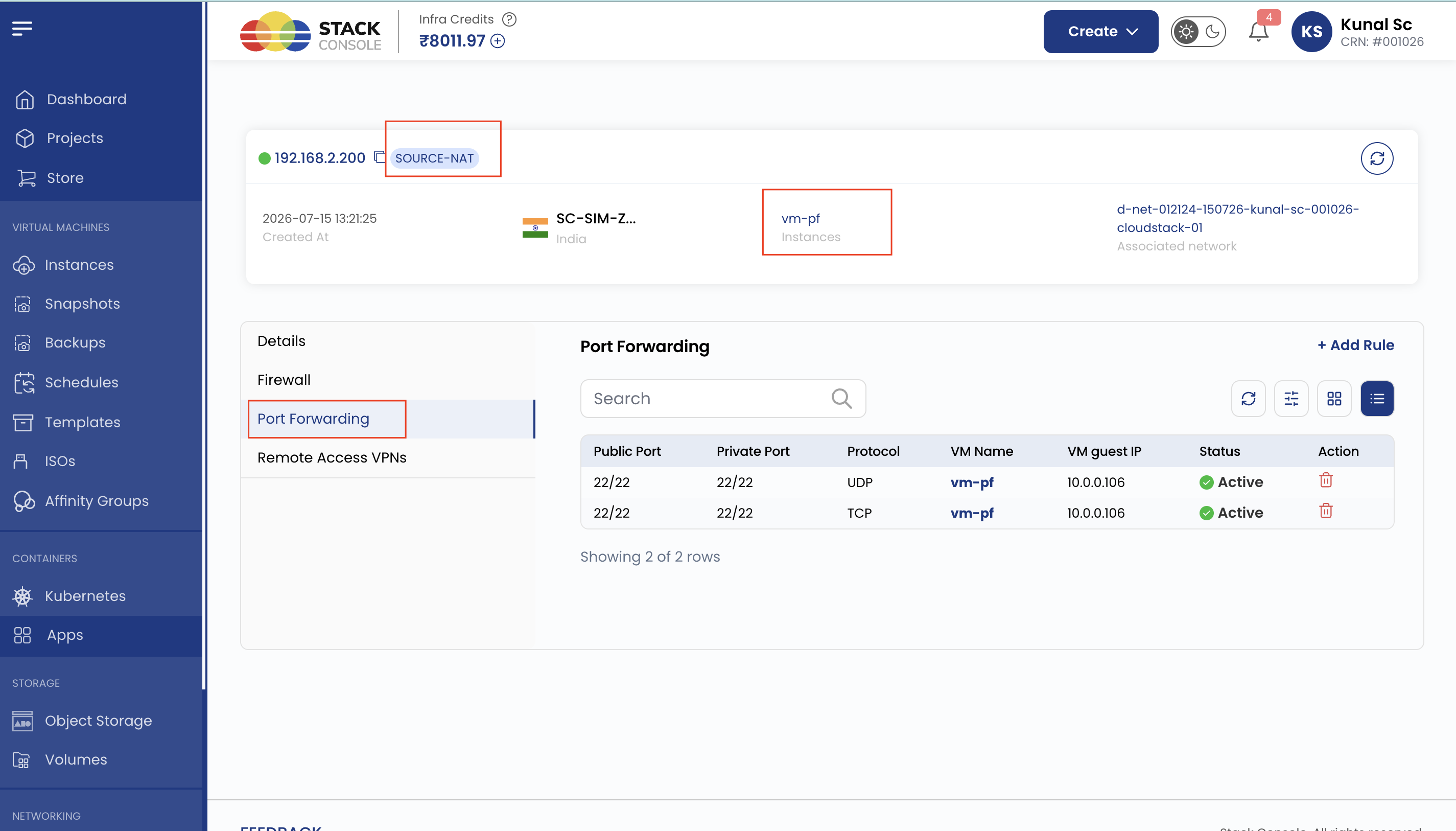
On isolated networks, the first public IP on a VM is the Source NAT IP. It can only use Port Forwarding, even if Default Network Strategy is set to Static NAT.
On VPC, the Source NAT IP cannot be used for VM or load balancer rules in CloudStack. Isolated-network SNAT reuse above applies to non-VPC isolated networks only. See Load Balancer — VPC Source NAT and IP Address — Source NAT IP reuse.
Last VM deletion and isolated network cleanup
When the last VM in an isolated network is deleted:
- CMP can automatically delete the isolated network
- Related resources are released — virtual router, Source NAT IP, and other network resources
This is controlled from Cloud Provider Setup (Wizard Step 2 — Provider Config):
| Field | Typical default | Effect |
|---|---|---|
| Delete Network on Last VM | Yes | If Yes, CMP deletes the network when the last VM in it is deleted. If No, the empty network (and typically its VR / SNAT IP) can remain until deleted manually |
Configure in Connecting CMP to CloudStack — Provider Config.
With Delete Network on Last VM = Yes, deleting the last VM frees the SNAT IP and tears down the VR. Creating a new VM later creates a new isolated network (new VR and a new Source NAT IP from the public pool). Plan quota and IP pool capacity accordingly.
End-user view
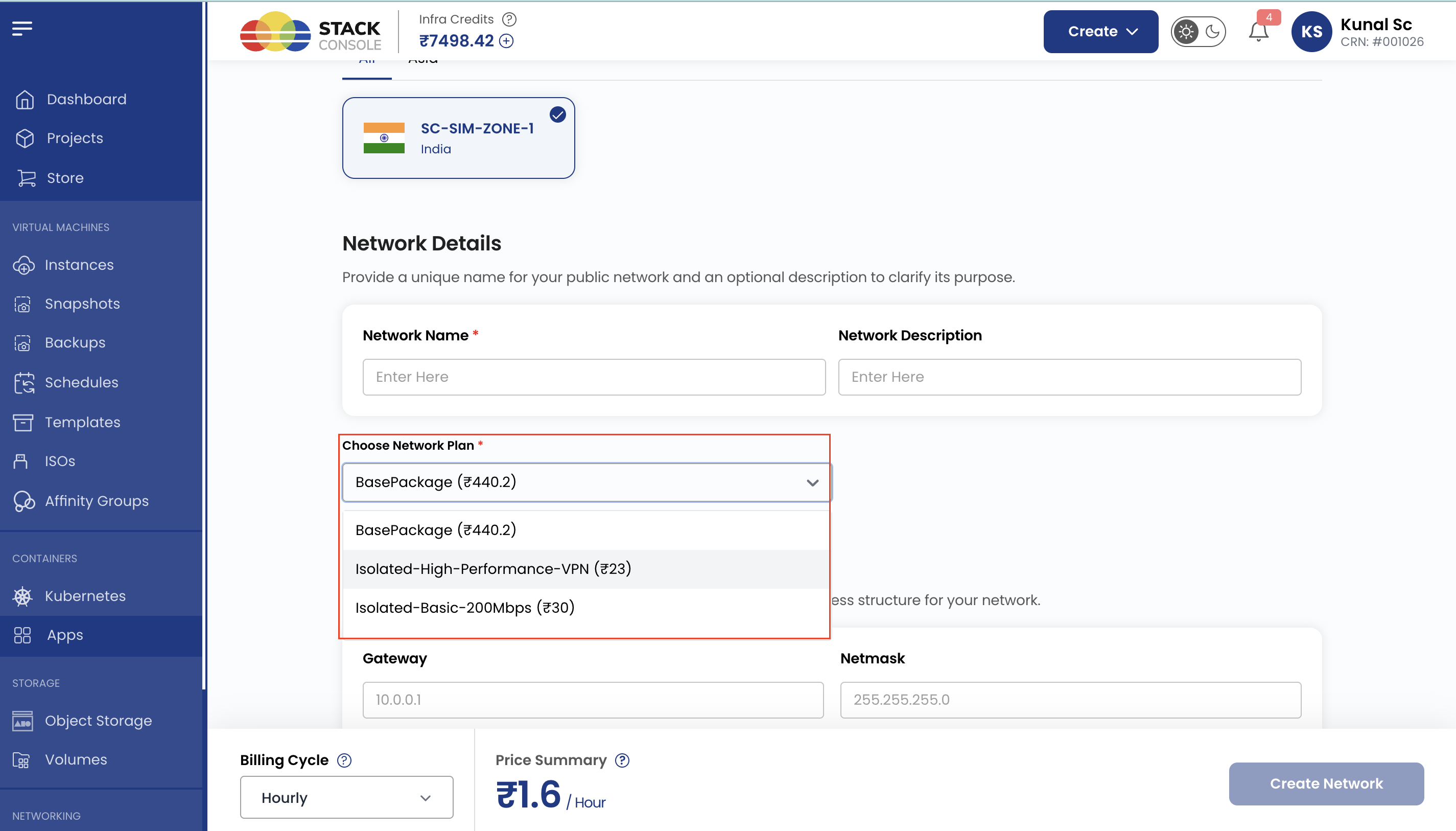
When multiple isolated network offerings / packages are configured in CMP, the end user can choose the package that fits their needs during network creation (or during flows that create an isolated network).
Best practice — package names:
- Use clear, meaningful names
- Reflect the real differences: performance, VR size, VPN/LB support, network rate, or use case
Examples:Isolated-Basic-200Mbps,Isolated-High-Performance-VPN,Isolated-LB-1Gbps