Networks
CloudStack network types available through CMP. Each type has its own guest network model, routing behaviour, and package requirements.
Admin setup for VPC packages and offerings: Virtual Router/VPC. Feature pages below cover how each network type works for customers and admins in CMP.
Network types
| Network type | Summary | Page |
|---|---|---|
| VPC Network | Private cloud with tiers, virtual router, NAT, ACLs, VPN | VPC Network — ready |
| Isolated Network | Dedicated guest network with its own virtual router | Isolated Network — ready |
| L2 Network | Layer-2 only — no virtual router / UserData limitations | L2 Network |
| Shared Network | Shared guest network across accounts (zone-scoped) | Shared Network |
VPC Network and Isolated Network are documented end-to-end (CloudStack behaviour + CMP). L2 and Shared remain stubs until expanded.
Public IP association: Port Forwarding vs Static NAT
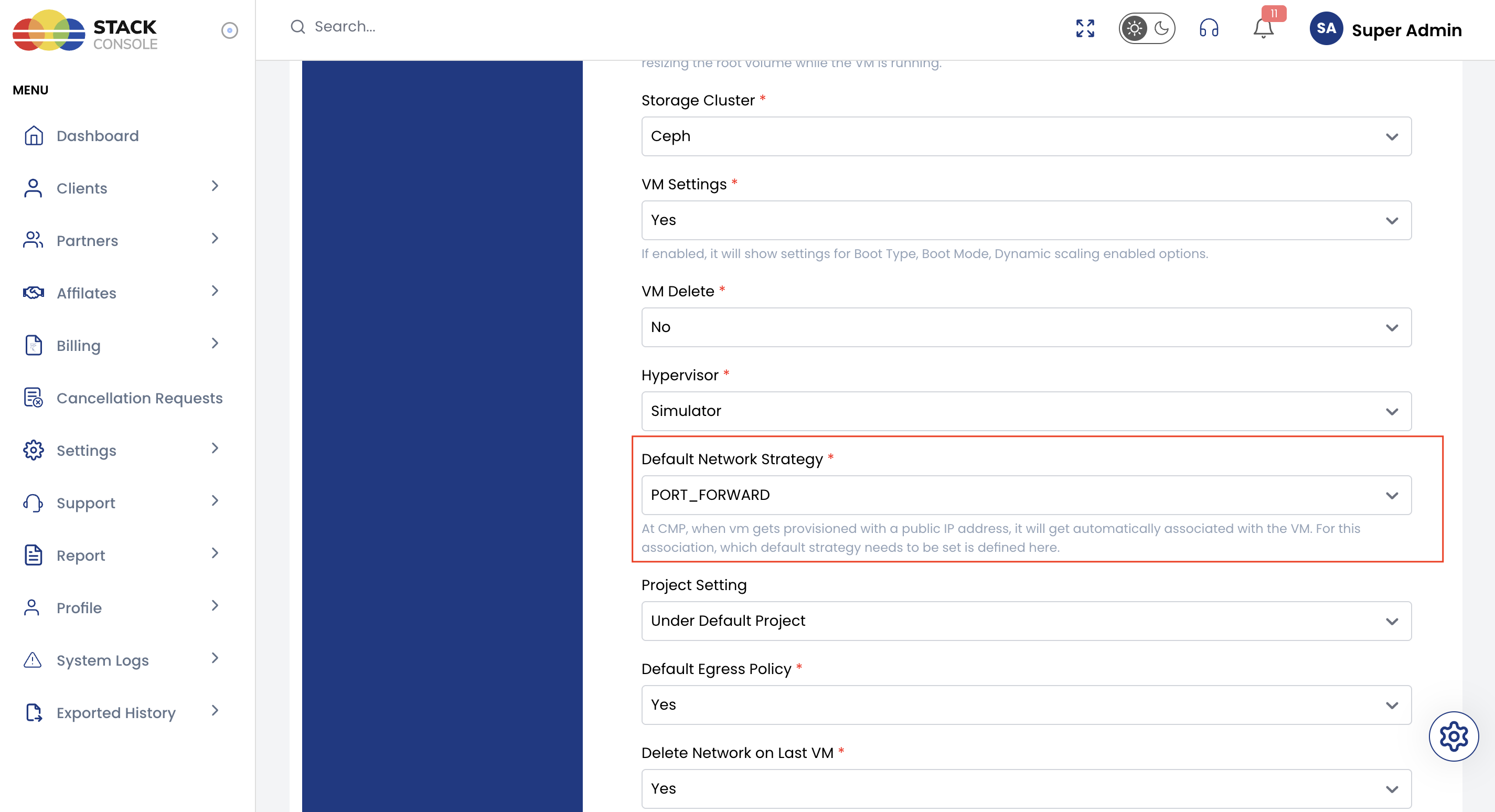
CMP can attach a public IP to a VM using either Port Forwarding or Static NAT. Which method runs automatically is controlled by the Cloud Provider setting Default Network Strategy.
Public IP attach on Create Instance
On the Create Instance page, when the customer requests a VM with public access, CMP does not leave networking as a separate manual step. Through CloudStack APIs it typically:
- Creates (or reuses) the guest network for the account
- Acquires a public IP address (or reuses Source NAT on an isolated network — see below)
- Attaches that IP to the new VM
How step 3 attaches the IP — Port Forwarding or Static NAT — is decided by Default Network Strategy on that Cloud Provider Setup. Customers do not pick the method on the Create Instance form; the admin setting drives this automated API flow.
Outside Create Instance, when a customer manually acquires or associates a public IP with a VM, they choose Port Forwarding or Static NAT themselves. Default Network Strategy does not force that choice.
What is Port Forwarding?
Port Forwarding maps a specific public port to a specific private port on a VM.
- A single public IP can be shared across multiple VMs
- Different ports are forwarded to different VMs
Example:
| Public endpoint | Destination |
|---|---|
1.2.3.4:22 | VM1 port 22 |
1.2.3.4:80 | VM2 port 80 |
Use Port Forwarding when you want one public IP for multiple services or VMs.
What is Static NAT?
Static NAT maps one public IP directly to one VM’s private IP.
- The entire public IP is dedicated to a single VM
- All ports are reachable on that IP (subject to firewall / ACL rules)
- No need to configure individual port mappings
Use Static NAT when a VM needs a dedicated public IP.
| Port Forwarding | Static NAT | |
|---|---|---|
| Public IP to VMs | One IP → many VMs (by port) | One IP → one VM |
| Port mapping | Explicit public → private ports | All ports (firewall permitting) |
| Best for | Sharing scarce public IPs | Dedicated IP per VM |
Default Network Strategy (admin setting)
Default Network Strategy tells CMP which CloudStack association method to use when it automatically attaches a public IP during Create Instance (network create/reuse → acquire IP → attach to VM via API).
Path: Settings → Orchestrator → Cloud Provider Setup → open the setup → Step 2: Provider Configuration → Default Network Strategy
| Option | Effect on Create Instance attach |
|---|---|
| Port Forwarding | CMP creates port-forwarding rules from the public IP to the VM |
| Static NAT | CMP enables Static NAT so the public IP maps 1:1 to the VM |
- Who sets it — Admin on Cloud Provider Setup
- When it applies — Automated public IP attach on Create Instance only
- Manual association — Customer chooses Port Forwarding or Static NAT; strategy does not override
- Exception — Isolated network Source NAT IP always uses Port Forwarding (see below)
Also documented in Connecting CMP to CloudStack — Provider Config.
Important — Isolated Networks and Source NAT
On Isolated Networks, the first public IP assigned to a VM is the network’s Source NAT IP.
That Source NAT IP supports Port Forwarding only — regardless of Default Network Strategy.
Static NAT (or Port Forwarding per the strategy) applies to additional acquired public IPs, not to the Source NAT address.
Details and reuse workflow: Isolated Network — Source NAT IP reuse.