Prepaid
In prepaid mode, customers must maintain a wallet balance. Usage is deducted in real time. CMP does not save credit cards for automatic charging in prepaid mode.
Set payment mode: Clients → Register Client (Step 2 — new onboarding) or Clients → [Customer] → Billing Setup (existing account)
Admin onboarding
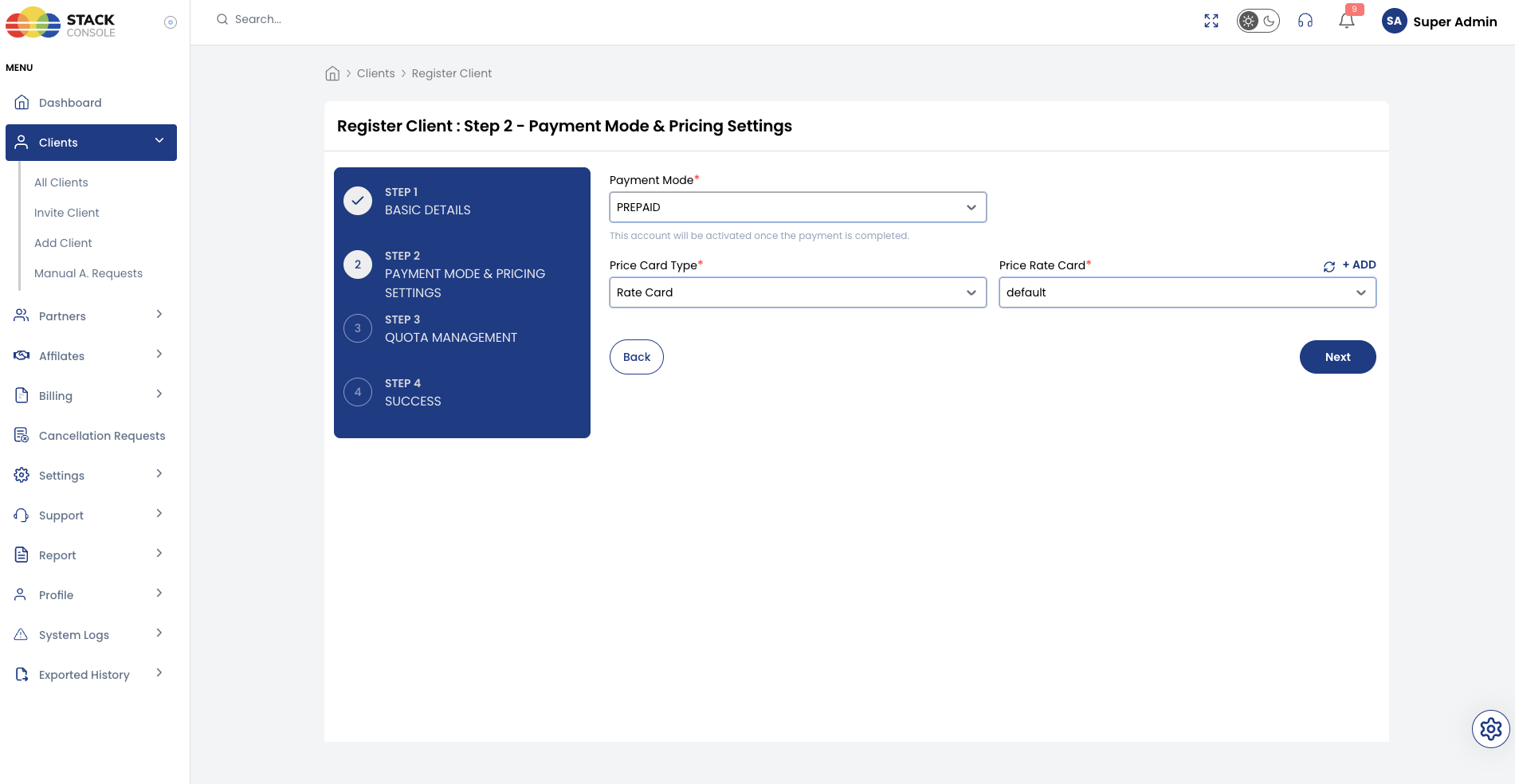
Admin selects PREPAID when onboarding a customer via Clients → Register Client.
| Step | Action |
|---|---|
| 1 | Basic Details — enter customer information |
| 2 | Payment Mode & Pricing Settings — select PREPAID, assign Price Rate Card |
| 3 | Quota Management — assign quotas |
| 4 | Success — customer must complete initial wallet payment to activate |
See Admin registration flow and Step 2 — Prepaid (admin).
Self-registration
Customers can select PREPAID on the public signup form when prepaid is enabled for Customer in Payment Mode Settings.
| Step | Action |
|---|---|
| 1 | Verify Email Address |
| 2 | Complete Payment — select PREPAID, choose top-up amount, pay via gateway |
On Step 2, the customer selects I want my account to be → PREPAID, picks a Select Amount (infra credits), and pays through the configured gateway. Account activates after payment.
| Rule | Behaviour |
|---|---|
| Service creation | Blocked if insufficient — CMP shows insufficient infra credit message; top up wallet to proceed |
| Service renewal | Auto-renews if balance sufficient; otherwise unpaid invoice + negative wallet |
| Wallet top-up | Manual only — no recurring auto top-up |
| Hourly services | Model 1: wallet deducted only. Model 2: wallet deducted + monthly service invoice on 1st |
| Fixed-cycle services | Full period charged from wallet at creation |
Service creation
| Wallet balance | Result |
|---|---|
| Sufficient | CMP allows service creation |
| Insufficient | Service creation is blocked — CMP shows an insufficient infra credit message. No invoice is generated. After the customer adds sufficient infra credit / wallet balance, they can create the service |
Service renewal
| Wallet balance | Result |
|---|---|
| Sufficient | CMP automatically renews the service |
| Insufficient | CMP generates an unpaid invoice, marks it unpaid, and wallet balance may go negative |
Renewal invoices are generated in advance for all billing cycles except hourly.
Wallet balance management
Customers manually top up the wallet through the configured payment gateway. There is no automated card charging or recurring top-up.
- On top-up, any negative balance is cleared first before crediting usable balance
- Usage charges are deducted from the wallet in real time
| Service type | Wallet behaviour |
|---|---|
| Hourly (PAYG) | Balance reduces continuously as the service runs |
| Monthly / quarterly / yearly | Full period deducted at service creation |
Example (hourly): Wallet ₹5,000 → VM ₹10/hour × 100 hours → wallet ₹4,000
Example (monthly): Wallet ₹5,000 → monthly VM ₹3,000 → wallet ₹2,000 immediately
Low balance handling
When wallet balance reaches zero or goes negative:
- CMP sends a notification alert to the customer
- Usage tracking may continue; balance may go negative
- On next top-up, the negative balance is cleared first
- If negative beyond the grace period, disciplinary actions apply
Disciplinary actions
If the wallet remains negative beyond the configured grace period, CMP triggers disciplinary actions (freeze, suspend, terminate) as configured in global or account settings.
Full documentation: Disciplinary Actions.
Assigning payment mode
Payment mode is set when the account is created. For admin onboarding, see Admin registration flow. For self-registration, see Self-registration flow.
Payment mode is effectively fixed after onboarding for prepaid and postpaid accounts. The only conversion path is Manual → Postpaid, which happens automatically when a manual customer saves a card:
| Conversion | Supported? | How |
|---|---|---|
| Prepaid → Postpaid | ❌ Not supported | Adding a card does not convert prepaid accounts |
| Prepaid → Manual | ❌ Not supported | — |
| Postpaid → Prepaid | ❌ Not supported | — |
| Postpaid → Manual | ❌ Not supported | — |
| Manual → Postpaid | ✅ Supported | Automatic when customer saves a credit or debit card |
Plan the correct payment mode before customers provision services. See Payment Modes — Changing payment mode.
Prepaid billing models — end-to-end workflow
Prepaid is wallet-based — the primary financial event may be wallet top-up (infra credits) or each service usage, depending on your tax and accounting rules. CMP supports two prepaid billing models.
| Model 1 | Model 2 | |
|---|---|---|
| Name | Invoice against infra credits | Invoice against service usage |
| Also called | Invoice for wallet transactions | Receipt for wallet + invoice for services |
| Wallet top-up | Invoice generated | Receipt generated |
| Service usage | Tracked internally — not invoiced | Invoice per usage event / renewal / monthly hourly total |
| Best when | Tax rules treat wallet funding as the main transaction (required for Indian providers) | GST, VAT, or e-invoicing requires invoices per service consumption |
Configure prepaid billing model
The active model is set globally in Admin Panel → Global Settings:
| Setting | Category | Value | Billing model |
|---|---|---|---|
generate_prepaid_reciept | Billing | false | Model 1 — invoice against infra credits (wallet top-up generates an invoice; service usage is not invoiced) |
generate_prepaid_reciept | Billing | true | Model 2 — invoice against service usage (wallet top-up generates a receipt; each service event generates an invoice) |
Description in CMP: For prepaid accounts, if true the system generates invoices for services, otherwise it generates invoices for adding infra credit (wallet funds).
For Indian cloud providers, set generate_prepaid_reciept = false (Model 1 — invoice against infra credits). This is the required prepaid billing model for India deployments.
Under Indian GST practice, the payable invoice is issued when the customer purchases infra credits (wallet top-up). Service usage is tracked and deducted from the wallet but is not invoiced separately. Model 2 (service invoices) is not supported for Indian prepaid workflows — it can cause billing confusion between infra-credit invoices and service invoices.
Configure generate_prepaid_reciept during initial platform setup — before onboarding prepaid customers or enabling self-registration. This flag applies platform-wide to all prepaid accounts. Changing it after customers and services exist can cause billing inconsistencies.
Decide the prepaid billing model before going live using generate_prepaid_reciept in Global Settings (see Configure prepaid billing model). Switching models after customers and services exist can cause billing inconsistencies for existing accounts.
Model 1 — Invoice against infra credits
Wallet top-up is the only invoice. Service creation, renewal, and hourly usage deduct the wallet but do not generate service invoices. Usage is recorded internally for reporting.
Monthly service example
Customer creates a monthly VM costing ₹1,000/month.
Step 1 — Add infra credits
- Customer adds ₹5,000 to the wallet
- CMP generates Invoice #1 for ₹5,000 (wallet top-up / infra credits purchase)
- Wallet balance = ₹5,000
Step 2 — Create service
- Customer creates the monthly VM
- CMP checks wallet balance
- ₹1,000 deducted immediately
- Wallet balance = ₹4,000
- No new invoice generated
Step 3 — Service renewal
- Next month the VM renews
- Another ₹1,000 deducted
- Wallet balance = ₹3,000
- No renewal invoice generated
Hourly service example
Step 1 — Add infra credits
- Customer adds ₹5,000 to the wallet
- CMP generates one wallet top-up invoice for ₹5,000
Step 2 — Create and run hourly VM
- Customer creates an hourly VM
- Throughout the month, hourly usage is deducted from the wallet
- No service invoice generated for hourly consumption
Model 1 summary
| Event | Invoice? | Wallet deducted? |
|---|---|---|
| Wallet top-up | ✅ Yes | — (credited) |
| Service creation (monthly) | ❌ No | ✅ Yes |
| Service renewal (monthly) | ❌ No | ✅ Yes |
| Hourly usage | ❌ No | ✅ Yes (continuous) |
| Service usage tracking | Recorded internally for reporting | — |
Model 2 — Invoice against service usage
Wallet top-up generates a receipt (not an invoice). Every billable service event generates a service invoice in addition to wallet deduction.
Monthly service example
Step 1 — Add infra credits
- Customer adds ₹5,000 to the wallet
- CMP generates a receipt (not an invoice)
- Wallet balance = ₹5,000
Step 2 — Create service
- Customer creates a monthly VM costing ₹1,000
- Wallet balance verified
- ₹1,000 deducted immediately
- Wallet balance = ₹4,000
- CMP generates a service invoice for ₹1,000
Step 3 — Renewal
- On renewal, another ₹1,000 deducted
- Wallet balance = ₹3,000
- CMP generates another service invoice for ₹1,000
Hourly service example
Step 1 — Add infra credits
- Customer adds ₹5,000
- CMP generates a receipt
Step 2 — Create and run hourly VM
- Customer creates an hourly VM
- Usage collected throughout the month (wallet deducted continuously)
Step 3 — Month-end invoicing (1st of next month)
- Total hourly usage calculated
- Wallet balance deducted for the period total
- CMP generates a monthly service invoice for total hourly usage
Model 2 summary
| Event | Receipt / invoice? | Wallet deducted? |
|---|---|---|
| Wallet top-up | Receipt | — (credited) |
| Service creation (monthly) | Service invoice | ✅ Yes |
| Service renewal (monthly) | Service invoice | ✅ Yes |
| Hourly usage (monthly) | Service invoice on 1st of next month | ✅ Yes |
| Service usage tracking | Every billable usage is invoiced | — |
Which model should you select?
| Choose Model 1 if… | Choose Model 2 if… |
|---|---|
| Indian providers — required; payable invoice on wallet top-up (infra credits) | Local regulations require an invoice for each billable service or renewal |
| Accounting or tax rules treat wallet funding (infra credit purchase) as the primary financial transaction | VAT or e-invoicing (outside India) requires invoices based on actual service consumption |
| Service usage only needs internal tracking and wallet deduction | Typical for EU VAT per-service, Latin America e-invoicing |
| Region | Required / typical model |
|---|---|
| India | Model 1 — generate_prepaid_reciept = false. Invoice on infra credit purchase; no service invoices |
| European Union | Model 2 — invoice per service for VAT; wallet top-up may be receipt only |
| Latin America (Mexico, Brazil, Chile) | Model 2 — e-invoicing per taxable event |
| Fiscalization countries (France, Spain) | Model 2 — real-time service-based invoicing |
Configure the applicable model for your deployment with your StackConsole / tax advisor before launch.
Hourly and fixed-cycle services (both models)
Wallet deduction behaviour is the same in both models. Invoice generation differs — see Model 1 and Model 2 above.
Fixed cycles (monthly, quarterly, yearly)
- Wallet balance checked at service creation
- Full period amount deducted immediately from wallet
- If wallet insufficient → service not created
- Model 1: no service invoice. Model 2: service invoice generated at creation and each renewal
Hourly (pay-as-you-go)
- Wallet deducted continuously as the service runs
- Model 1: no service invoice — wallet top-up invoice only
- Model 2: consolidated service invoice on the 1st of the next month for total hourly usage
VM upgrade billing (prepaid)
Hourly services
| Period | Charging |
|---|---|
| Before upgrade | Original package hourly rate — immediate invoice generated |
| After upgrade | New package hourly rate from upgrade moment to month end |
Monthly and other fixed cycles
Prorated adjustment calculated from upgrade date to end of billing period.
Example — monthly billing:
| Item | Value |
|---|---|
| Original package | $100/month |
| Upgrade date | 12th of month |
| New package | $150/month |
| Proration base | 30.5 days |
Old daily rate     = $100 ÷ 30.5 ≈ $3.28/day
Used (12 days)     = 12 × $3.28 = $39.36
Remaining old (18d) = 18 × $3.28 = $59.04
New daily rate     = $150 ÷ 30.5 ≈ $4.92/day
New portion (18d)  = 18 × $4.92 = $88.56
Upgrade adjustment = $88.56 − $59.04 = $29.52
Prepaid upgrade invoicing:
- A separate payable invoice is created for each upgrade
- Example: invoice on 1st for $100 (full month); on 12th upgrade, new invoice for $29.52 adjustment
Early deletion before cycle ends
| Billing cycle | Charge on early delete |
|---|---|
| Hourly | Pay only for hours used (creation to deletion) |
| Monthly / quarterly / yearly | Full period still charged — no refund. Admin may grant free credits if customer disputes |